



Buyer’s Guide: Should You Build or Buy LMS Software?

At 500 learners, buying a SaaS LMS is the obvious call. At 5,000 learners, it starts looking like an expensive mistake.
Somewhere between those two numbers, the question arises: Maybe we should build our own?
Academy Smart has been an LMS software development company for 15+ years. We’ve built custom LMS platforms for training companies, regulated enterprises, and professional associations across 19 countries. Which means we’ve seen enough of build vs. buy analysis to know what companies usually get wrong.
This guide gives you a working model, revealing what SaaS actually costs at scale, when the financial case for custom kicks in, and why the old “build = 18 months and $350K” assumption hasn’t been true for years.
TL;DR
SaaS LMS wins early. LearnUpon, Docebo, and TalentLMS are the right call for the first 12–18 months. After that, per-seat pricing becomes a tax on your own growth.
The subscription line is roughly 20% of what a SaaS LMS actually costs. Admin overhead, integration workarounds, missing features, and eventual migration costs make up the other 80%.
SaaS vendors don’t build enterprise features because it’s the wrong business decision for them. Your priorities stay on the roadmap.
80% of any LMS is identical across organizations. A specialized partner deploys that foundation on day one; the budget goes toward the 20% that’s specific to your business. Delivery: ~6 months.
A custom LMS at $85K pays for itself in under 12 months with 1,000 users on $8/month SaaS. After the crossover point, every new learner costs nothing.
Where SaaS LMS wins
SaaS LMS platforms like LearnUpon, Docebo, TalentLMS, and 360Learning exist because they solve a problem. When your training operation is early-stage, and your requirements are standard, they’re the right call.
Zero infrastructure burden
Hosting, uptime, and security patches are all on the vendor.

Fast deployment
Most LMSs are live within days to a few weeks.

Predictable entry cost
Talent LMS starts at flat-tier plans from around $1.09/user/month for smaller teams. LearnUpon and Docebo run $6–$10/user/month, with annual contracts typically starting around $15,000–$25,000/year.

Standard feature set
For companies with basic needs, the out-of-the-box functionality covers the job.

For the first 12–18 months of most training operations, SaaS is the correct decision. It removes infrastructure decisions from the table while you figure out what your platform actually needs to do. But…
But the bill grows every time you succeed
The SaaS pricing model is built around your growth. And your growth pays their revenue. At 500 users and $8/user/month, that’s $48,000/year. At 2,000 users, $192,000. At 5,000, you’re deep into six-figure territory, and that’s before support, integrations, and add-ons.
Those additions accumulate fast:
Support tiers
Typically cost an additional 10–25% on top of the base license.

Integrations
$1,000–$15,000 each to set up, plus $500–$3,000 per year to maintain.

Analytics and BI add-ons
Add 20–50% to the base subscription, or $500–$5,000/month.

Sana Learn, one of the newer AI-native LMS platforms, starts at $13/user/month with a minimum of 300 seats. That’s $46,800/year before a single integration is built. Add support premium and a basic HRIS connection, and you’re well past $60,000 in year one for a platform that’s not yet connected to the rest of your systems.
Per-seat pricing is a growth tax. Every learner you add increases your vendor’s revenue and shrinks your margin.
The SaaS roadmap conflict
Here’s the structural problem that SaaS pricing alone doesn’t capture.
The feature you actually need, no matter if it’s complex multi-tenancy for your B2B clients, CPD tracking, or a custom hierarchy, is always “on the roadmap.” 18 months later? Still there.
This is the SaaS roadmap conflict. SaaS LMS vendors systematically avoid building enterprise features, because they tend to believe it’s the wrong business decision. And they have their reasons. Enterprise-specific features increase support costs, break standardization, and don’t scale across a customer base of thousands.
LearnUpon’s roadmap, for example, is designed for the median of their entire customer base.
The result is predictable: you build workarounds. Concretely, you pay a developer to extend what the vendor won’t touch. Then you reconcile CPD records in spreadsheets. And at some point, your LMS slowly becomes half-platform, half-patchwork, and the patchwork has a maintenance cost that never appears on the SaaS invoice.
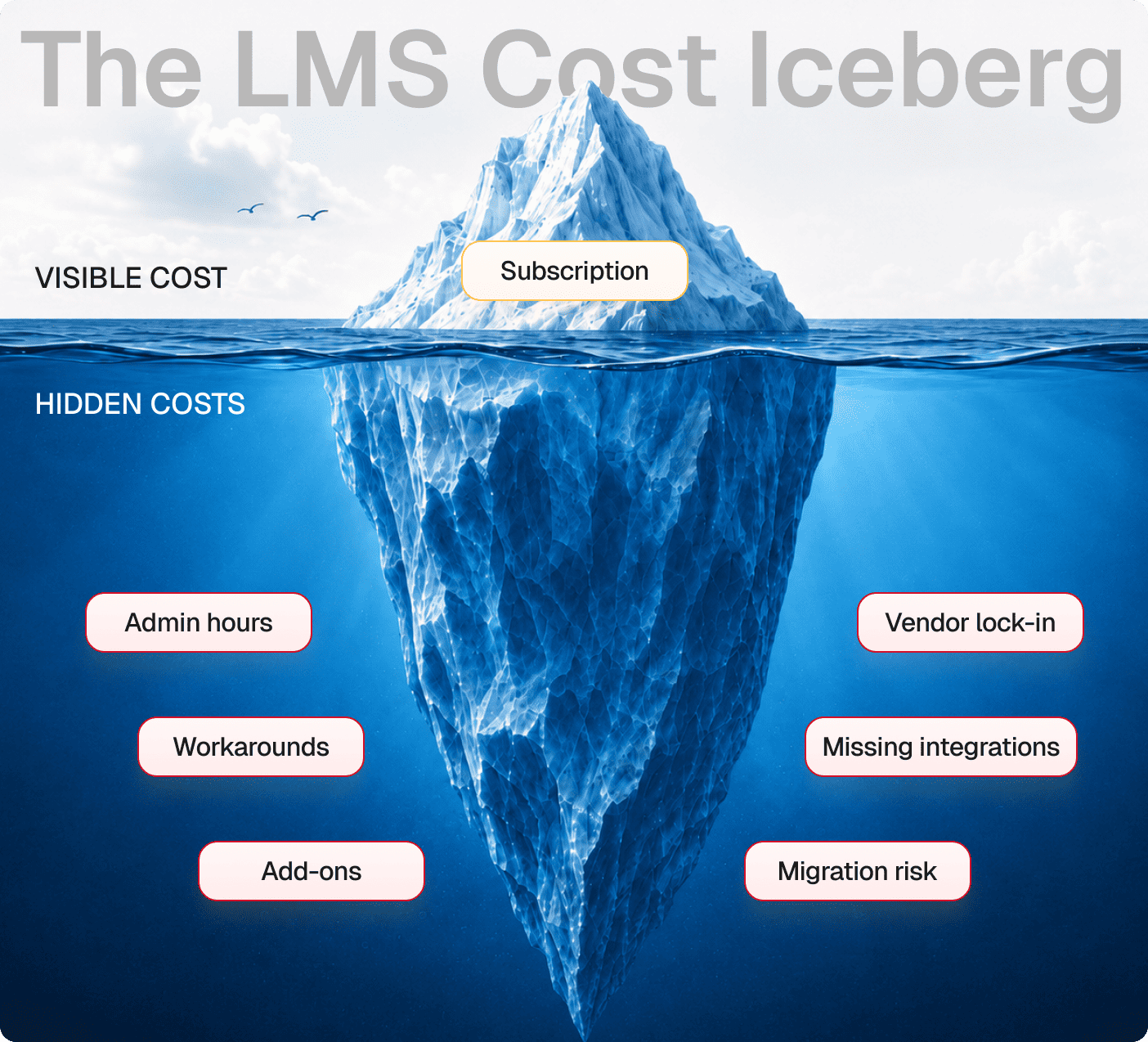
The LMS cost iceberg
The subscription line is roughly 20% of what a SaaS LMS actually costs.
The LMS Cost Iceberg includes 2 parts:
- Visible (≈20%): subscription fees.
- Hidden (≈80%): admin hours, integrations, features on the roadmap for 18 months, migration costs when you eventually move.
Most teams don’t run the full calculation until year two or three. By then, the gap between expected and actual spend is significant.
One training company we spoke to had been on a SaaS LMS for three years. When we worked out the total cost, including subscription, admin overhead, integration development, and workaround maintenance, it came to nearly double what they’d budgeted for.
That’s why, before talking about buying or building an LMS, you should calculate all expenses to see the full picture. And if SaaS costs you more than it’s worth, it’s time to talk about a custom LMS and see if it’s really more expensive (likely, it is not).
The old fears about custom LMS are outdated
A custom LMS is your platform, built around your workflows. The advantages compound over time:
No per-seat pricing
No per-seat pricing
Your 10,000th learner costs the same as your first.

IP and data ownership
You can deliver training to clients under your brand.
Native integrations
Azure AD, Power BI, Salesforce, or a custom HRIS.
CPD architecture
Track learning across events, certifications, and self-reports.
No roadmap dependency
When your business model changes, your platform changes with it.
And how does it look in practice?
Best for: To give you an example, Cyber Inc, a Netherlands-based security awareness training company, had outgrown SaaS. Their platform needed to serve 86 client companies under separate branding, across 27 languages, with SAML 2.0 authentication, Microsoft Graph integration, and Power BI reporting. No SaaS vendor was going to build that for one customer. Academy Smart delivered it in 5 months at 68% lower cost than their previous SaaS setup.
Yet some fears are worth taking seriously
But of course, the traditional case against custom LMS isn’t baseless:
- High upfront capital. Full custom LMS development typically starts at $85,000 for a production-ready platform, and climbs with complexity. That’s not a monthly subscription line.
- The wrong partner is a real risk. A generic dev agency without LMS domain expertise will deliver a codebase nobody can maintain. The tech debt horror stories almost always trace back to the wrong vendor decision.
- Timelines. Generic agencies build from scratch. That’s where the 12–18 month estimates come from, as they’re accurate for teams that don’t have LMS-specific foundations to build on.
But there is good news as well: you can choose an expert partner with a pre-built LMS foundation and pay much less upfront.
The 80/20 LMS delivery model
The build vs. buy debate assumes “build” means starting from scratch. That assumption is 10 years out of date.
80% of what any LMS does is identical across companies. In the end, each LMS must include user accounts, course delivery, roles and permissions, SCORM and xAPI playback, reporting, multi-tenancy, and enrollment automation.
Our 80/20 LMS delivery model is built on this reality:
- 80% deploys on day one: production-tested foundations covering every standard LMS function
- 20% is engineered to your business: your CPD compliance architecture, client hierarchy, HRIS and CRM integrations, and custom workflows
You’re only spending your budget on the 20% that creates the competitive advantage.
Pre-built foundation
Ships on day one
- Users, courses & roles
- SCORM / xAPI / LTI
- Multi-tenancy
- Reporting & analytics
- Enrollment automation
Your business
- CPD & compliance
- HRIS & CRM
- Custom workflows
What the pre-built foundation includes on day one:
- Multi-tenant architecture with separate branding and admin
- SCORM / xAPI / LTI compliance
- Role-based access, group management, enrollment automation
- Course catalog and learner portal
- Basic reporting and completion tracking
What gets built on top:
- Your CPD tracking model and regulatory reporting
- HRIS / CRM / ERP / analytics integrations (native, not middleware)
- White-label client portals at scale
- Gamification, certification, and monetization logic
- Any feature your previous vendor told you was on the roadmap
What about the timeline and cost?
Generic agencies building from scratch quote 12–18 months. Starting from a pre-built LMS foundation, we deliver in approximately 6 months.
The pre-built foundation starts at $17,000 as a one-time fee. Full custom LMS development starts at $85,000, depending on scope and integration complexity.
At 1,000 users paying $8/user/month on SaaS, that’s $96,000/year. An $85K custom LMS pays itself back within 12 months. A $17K pre-built foundation pays itself back in under 4 months at the same scale.
Find out when building becomes cheaper than buying
SaaS LMS platforms are the right decision for companies getting started. They remove infrastructure complexity from the table while you figure out what your platform needs. But they’re the wrong decision for those who have already figured that out.
The outdated version of “build” that takes 18 months and $300K is not the only option. The 80/20 model changes the timeline, the cost structure, and the risk profile. Instead of reinventing the wheel, you’re customizing the 20%.
Most teams have never added up the full three-year cost of their current setup. The calculator does it in under five minutes. Put in your user count, your current per-seat rate, and your integration footprint, and it’ll show you the full cost of your current setup against a custom build.