
CONTINUING EDUCATION MANAGEMENT SOFTWARE
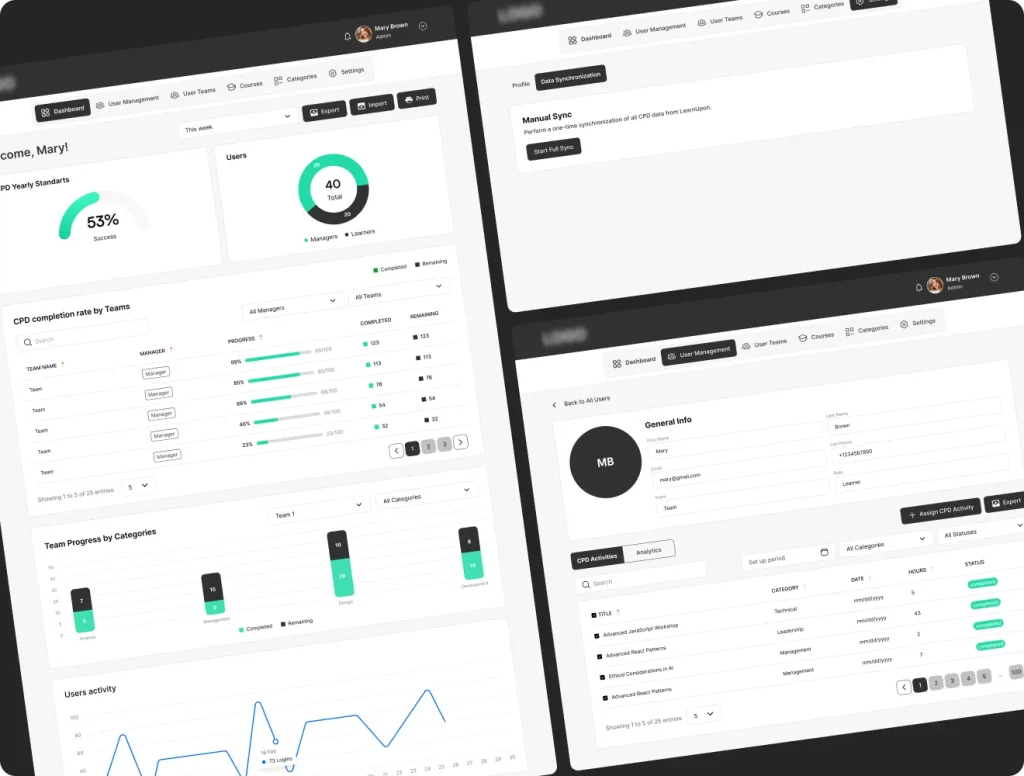
Your LMS tracks courses, but it doesn’t give you a complete continuing professional development record. Our dashboard does. Track hours, categories, external activities, and deadlines on top of your LMS.

Struggling to prove compliance?
You're a regulated organization or professional association with CPD obligations. Your staff are completing training, collecting certificates, logging hours. The work is getting done. Except when audit season arrives, you can't prove the training took place.
The CPD record lives in four different places
In an LMS export, a shared folder, a spreadsheet someone updates when they remember, or someone's inbox. When the auditor asks for a complete CPD record for every member of staff across every category for the past 12 months… that becomes a problem.
Reconciliation takes up 40% of the working month
Matching hours to categories by hand, chasing down certificates, rebuilding a record that should already exist — a huge part of a compliance manager's month. Every month.
There’s a simpler way to manage continuing education
CPD Dashboard is our ready-made system for managing CPD. It is already integrated with LearnUpon and Docebo and can connect to other LMS platforms, too, so you can keep a complete, audit-ready record of all professional training in one place.
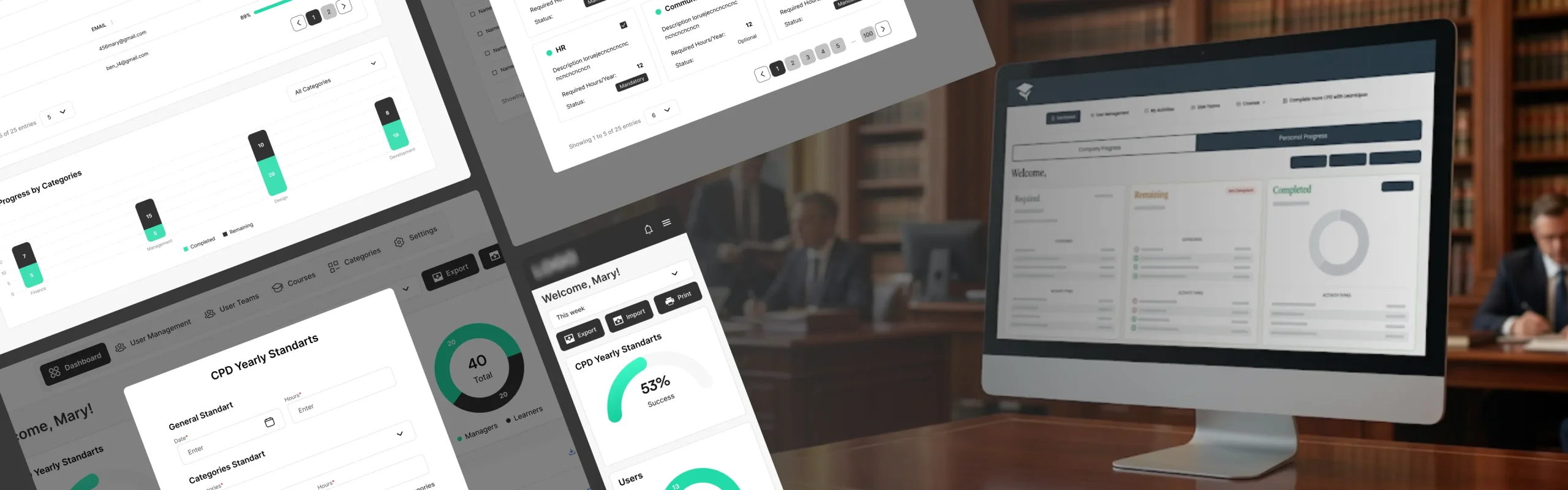
Export the full CPD record when the auditor asks
Internal courses, external training, certificates, reflection notes, hours by category. Everything lives in one system, visible to learners, managers, and compliance teams in real time.
Deadlines don’t get missed
Set mandatory categories, yearly hour targets, and submission deadlines by role, department, or region. From that point on, the system tracks them automatically.
Get every completed course as a CPD record
Sync with LearnUpon, Docebo, or any other LMS. Completed courses update CPD hours in real time, so you don’t have to import anything or fix mismatches between your training platform and your audit record.
See who’s falling behind before your auditor does
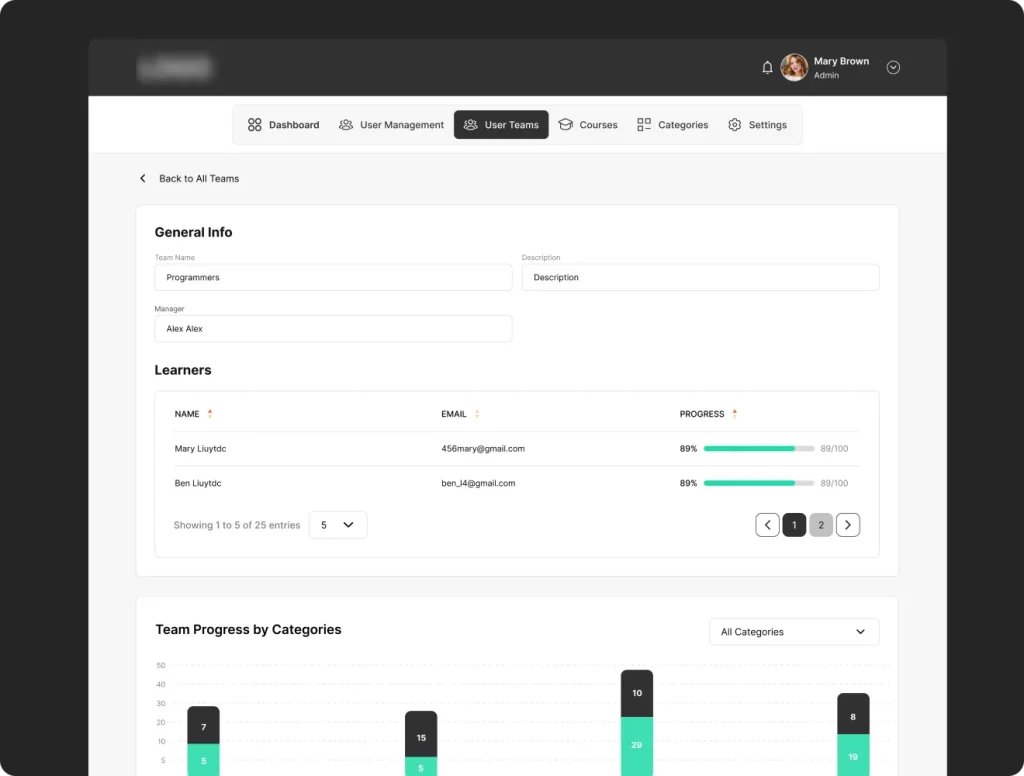
Managers see how their teams are doing. Compliance teams spot gaps by category or region. Everyone sees their own progress and deadlines — in one dashboard.
Save more as your organization grows
Most CPD platforms charge per seat, so every new employee increases your cost. With our CPD Dashboard, you pay once. Be it 200 users or 2,000 — the price stays the same.
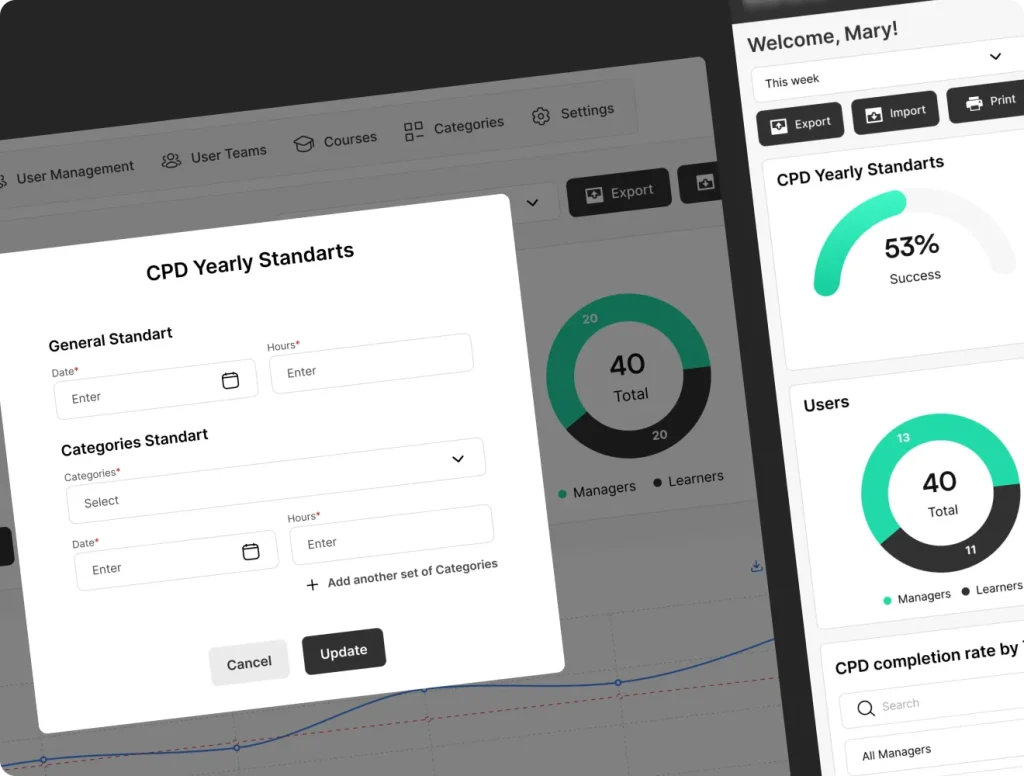
Take a look inside CPD Dashboard
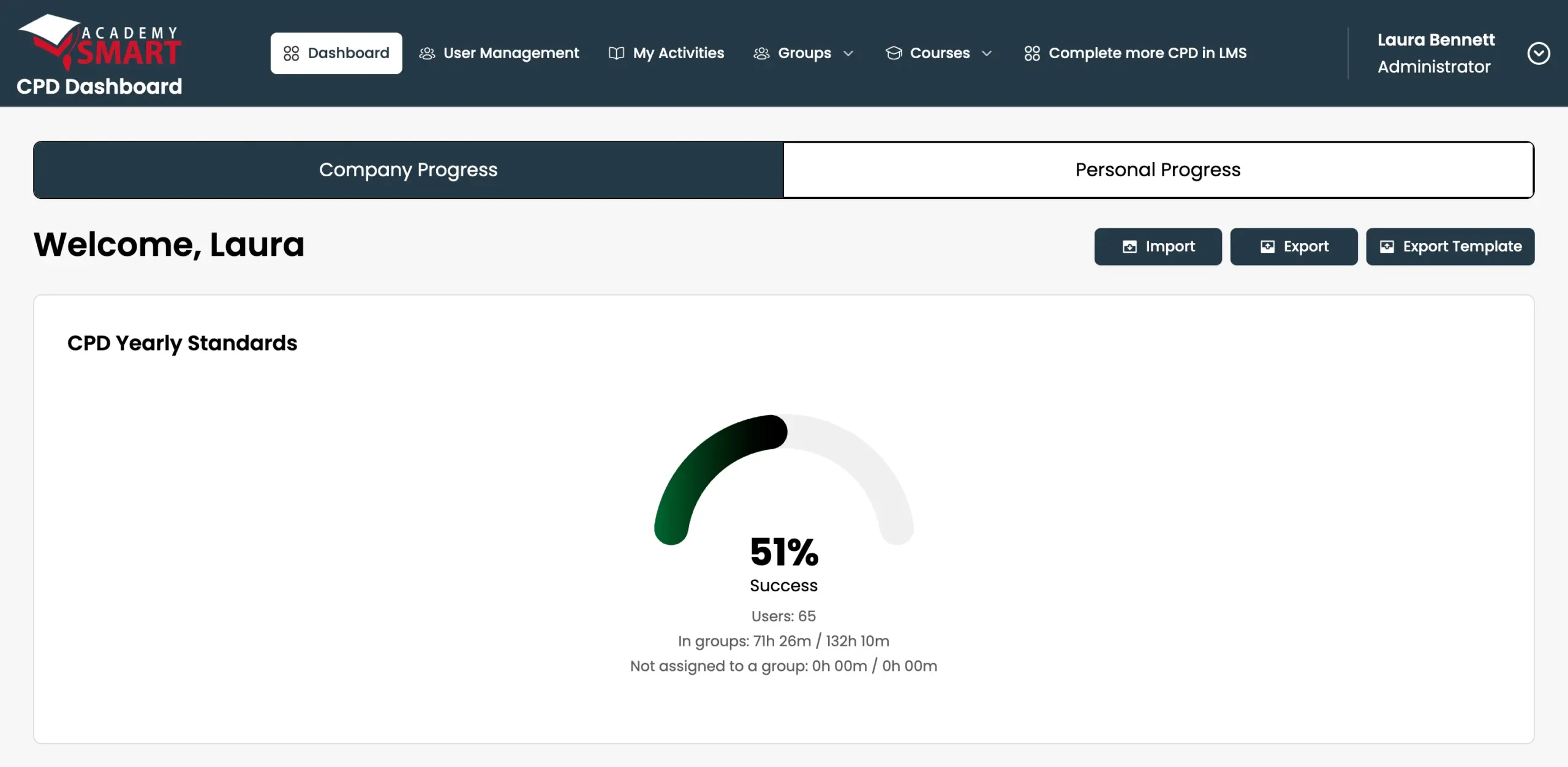
- 1 Company or personal viewSwitch between the whole organization and your own CPD record.
- 2 Import & exportBring in existing CPD records, or export them when the auditor asks.
- 3 Yearly standardsThe share of required CPD hours completed across the organization.
- 4 Hours by groupCompleted against required hours, in groups and outside them.
- 5 Back to the LMSOne click from the dashboard to courses in your LMS.
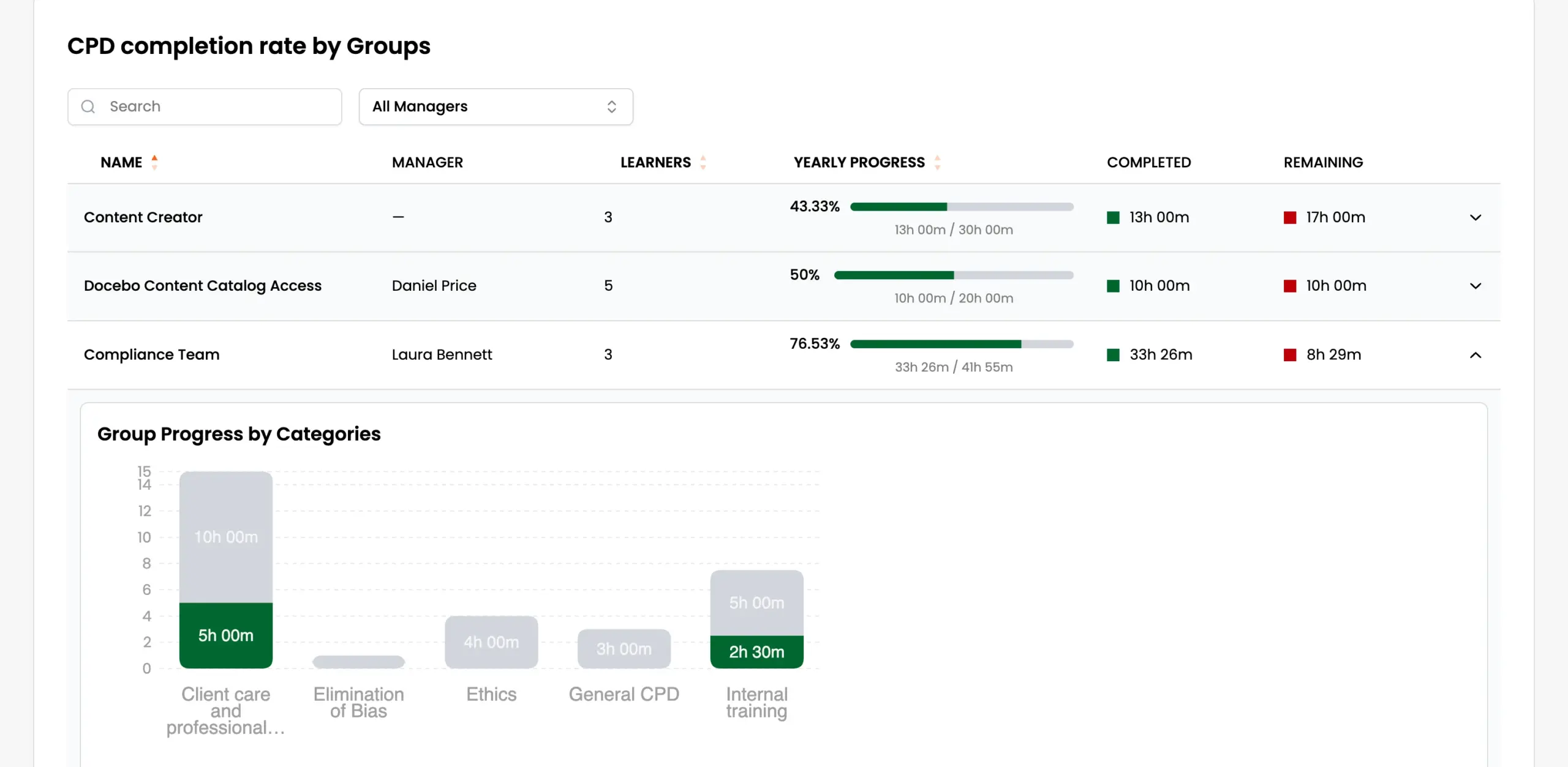
- 1 Every groupCompletion rate for each group, team, or department.
- 2 Filter by managerSee only the groups a manager is responsible for.
- 3 Yearly progressHours completed against each group’s yearly target.
- 4 Completed vs remainingWhat’s done and what’s still missing, in hours.
- 5 Progress by categoryExpand any group to see which categories are behind.
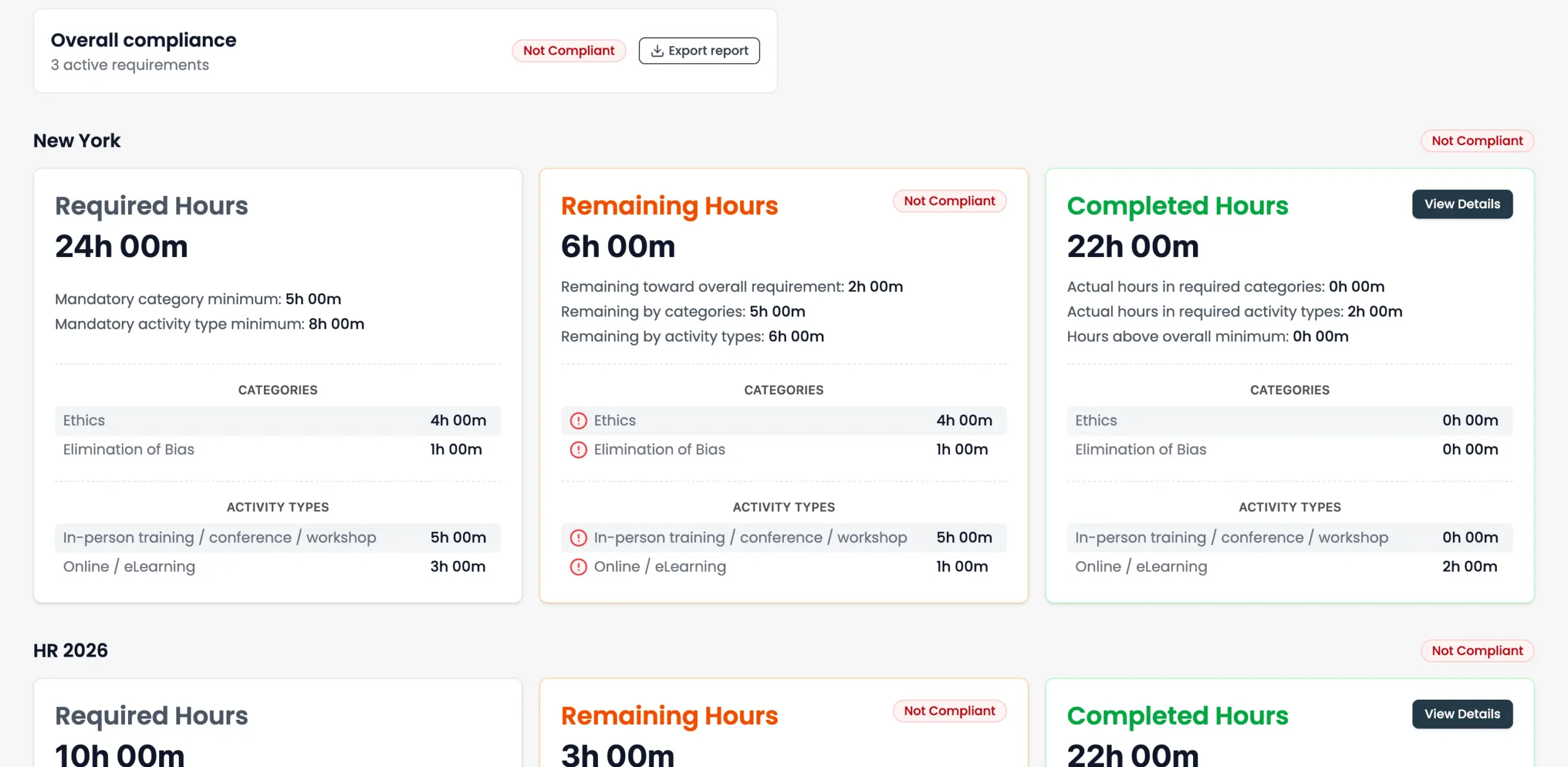
- 1 Overall complianceYour status across all active requirements, with a report to export.
- 2 One block per requirementEach region or team requirement is tracked on its own.
- 3 Required hoursThe total, plus mandatory minimums by category and activity type.
- 4 Remaining hoursWhat’s still missing, with each gap flagged.
- 5 Completed hoursHours already logged, with details on demand.
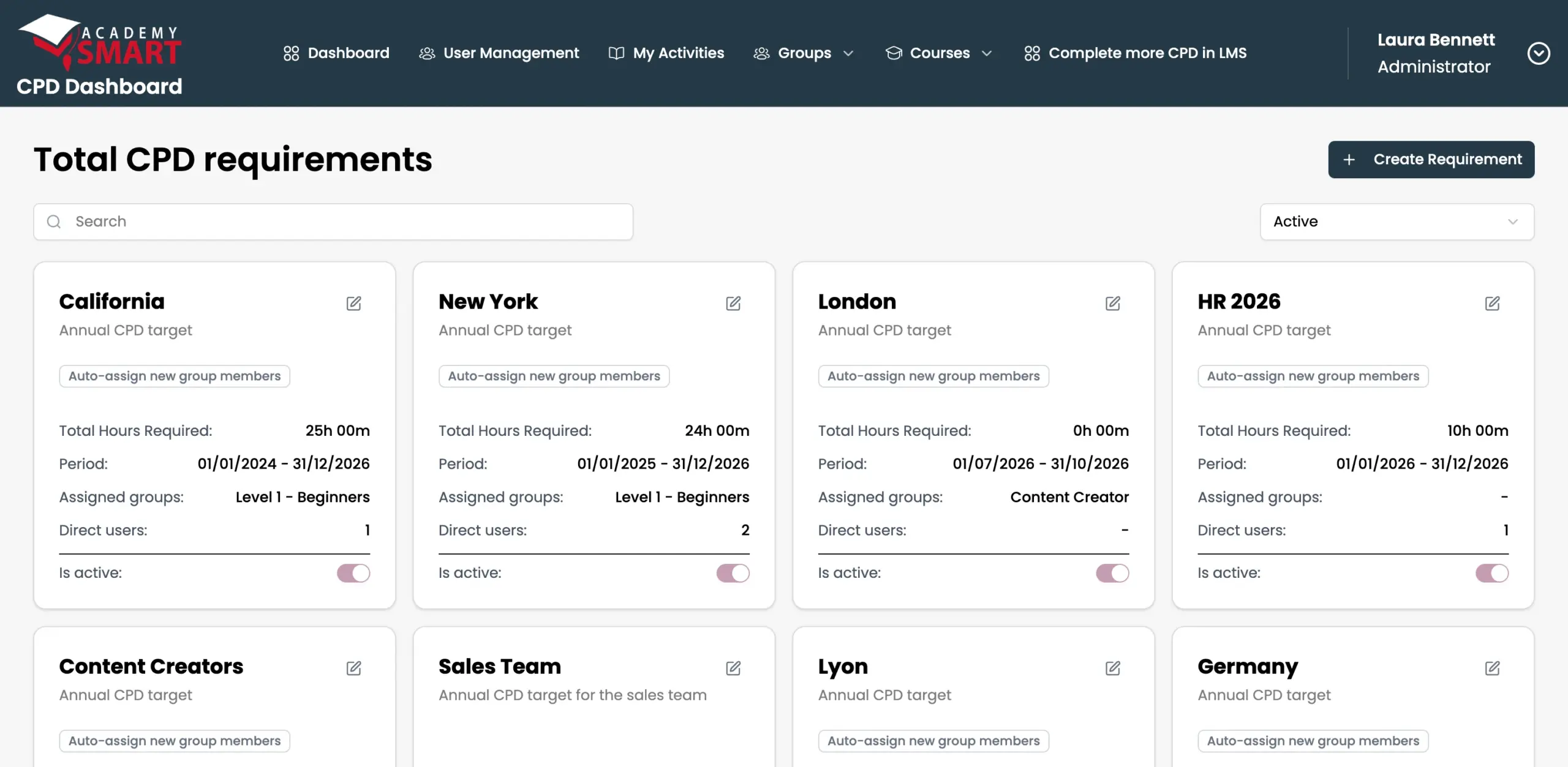
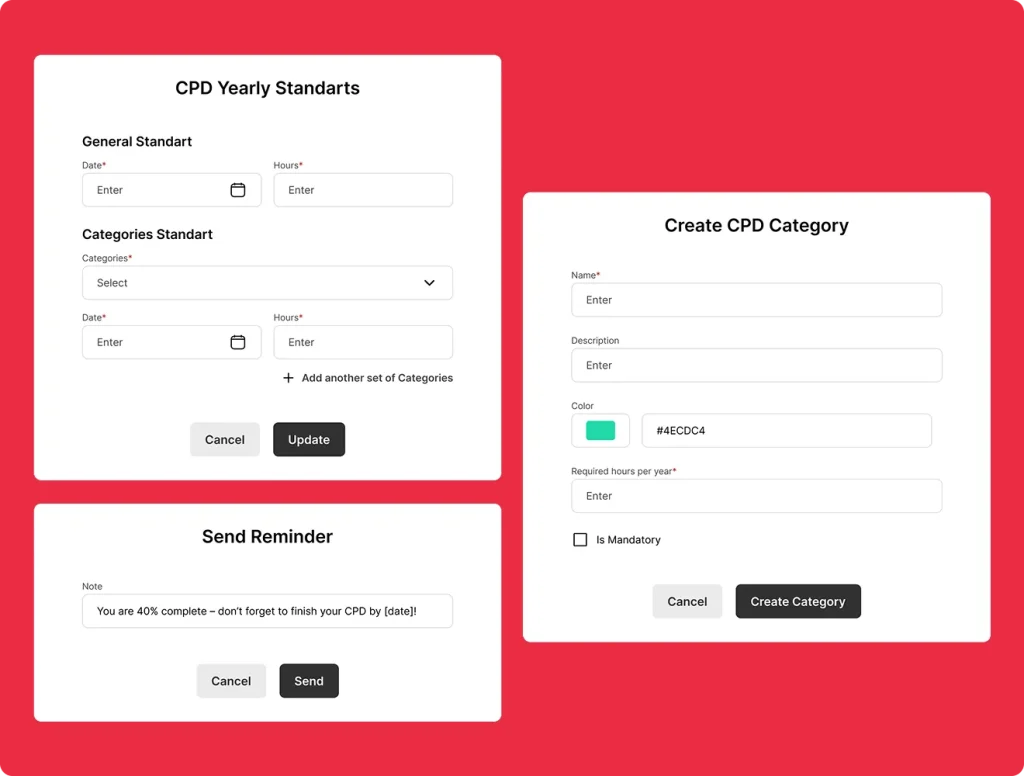
- 1 Create a requirementSet a CPD target for a region, team, or role.
- 2 By region or teamCalifornia, New York, HR: each with its own rules.
- 3 Auto-assignNew group members get the requirement automatically.
- 4 Hours and periodRequired hours and the dates they apply to.
- 5 Groups & usersAssign whole groups or individual people.
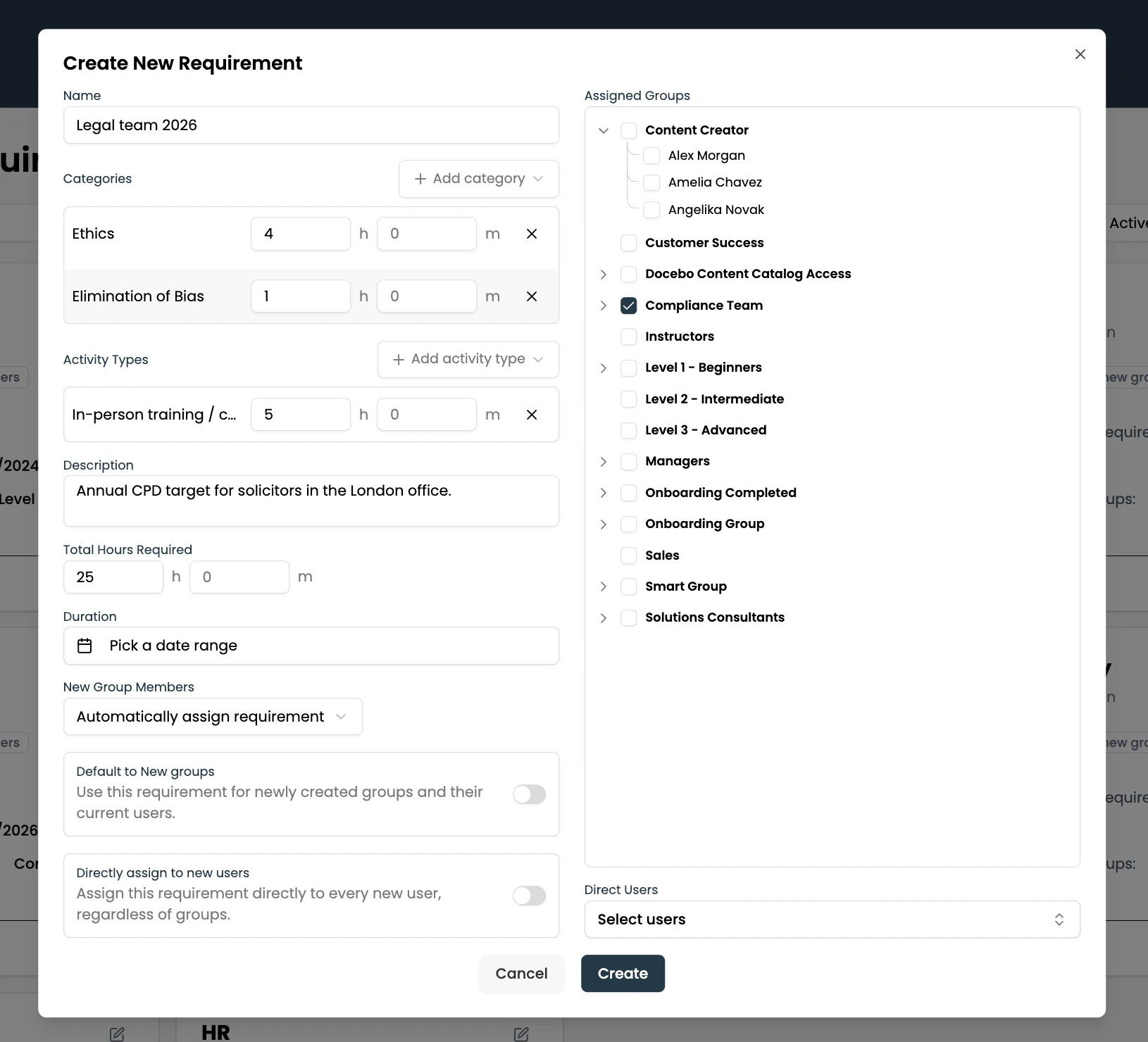
- 1 Hours by categorySet a minimum for each CPD category inside the requirement.
- 2 Hours by activity typeRequire in-person training, eLearning, or any type you define.
- 3 Total hours & periodThe overall target and the dates it applies to.
- 4 New group membersAssign the requirement automatically to anyone who joins.
- 5 Defaults for new groups & usersApply it to every new group, or to every new user regardless of groups.
- 6 Any groupsPick whole groups, or individual people inside them.
- 7 Direct usersAdd specific people on top of the groups.
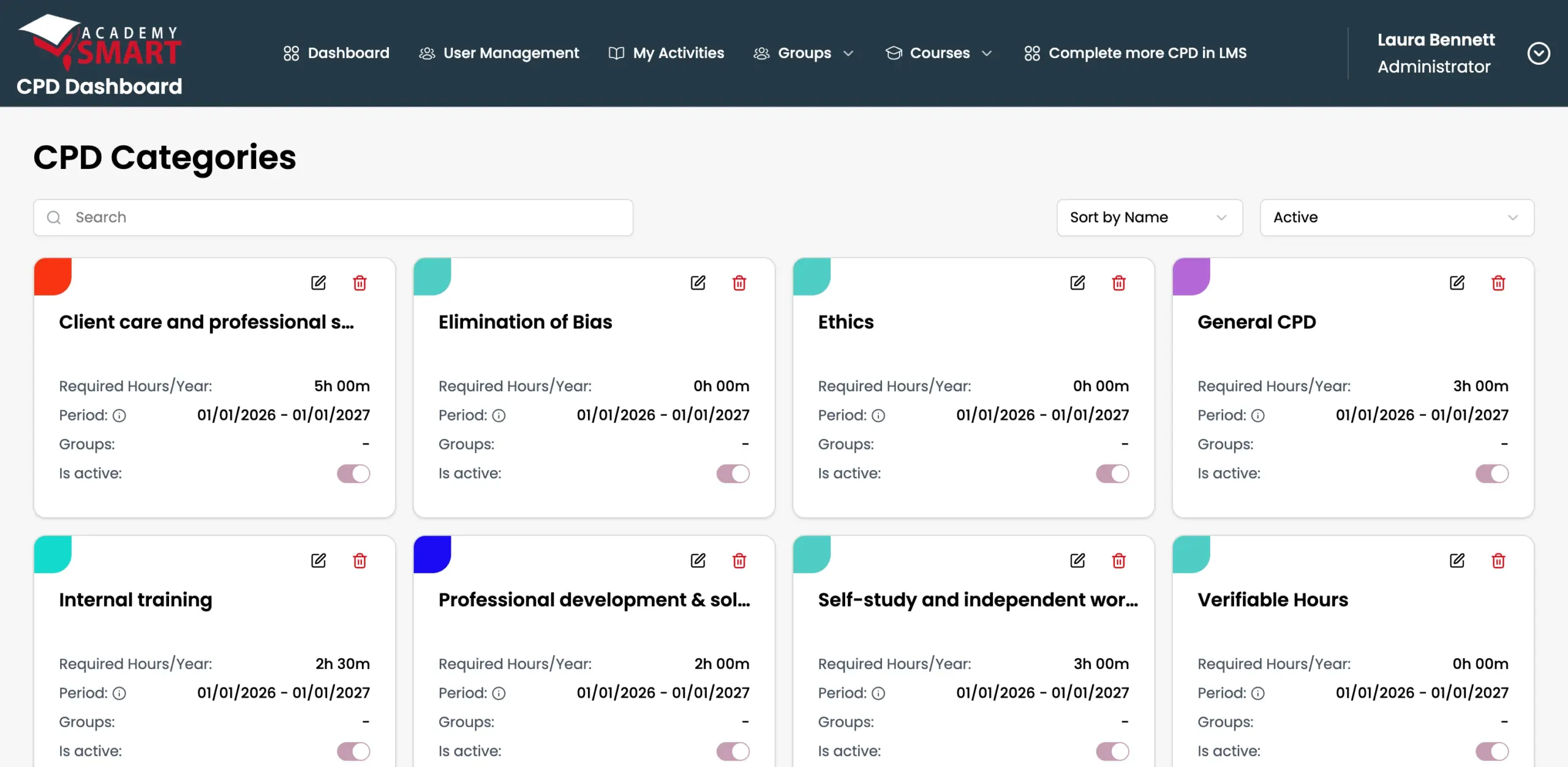
- 1 Colour-codedEach category has its own colour across the dashboard.
- 2 Hours per yearSet the required hours for every category.
- 3 Edit any timeChange categories as your standards change.
- 4 Sort & filterSort by name and show active or archived categories.
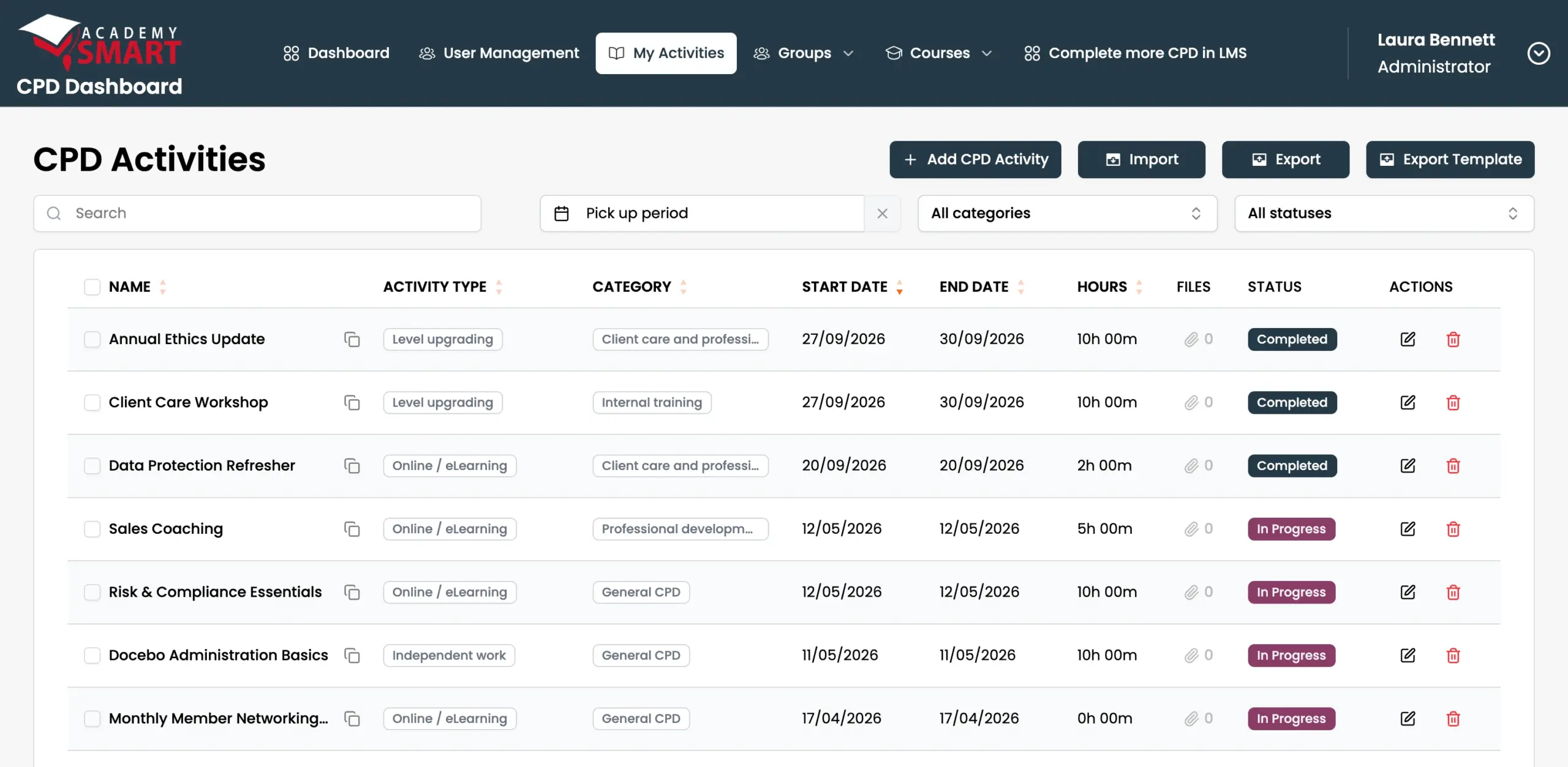
- 1 Log any activityCourses, workshops, conferences, and self-study.
- 2 Filter by periodPick a date range, category, or status.
- 3 Type & categoryEvery activity counts toward the right CPD category.
- 4 Evidence attachedUpload certificates and files as proof.
- 5 StatusCompleted or in progress, at a glance.
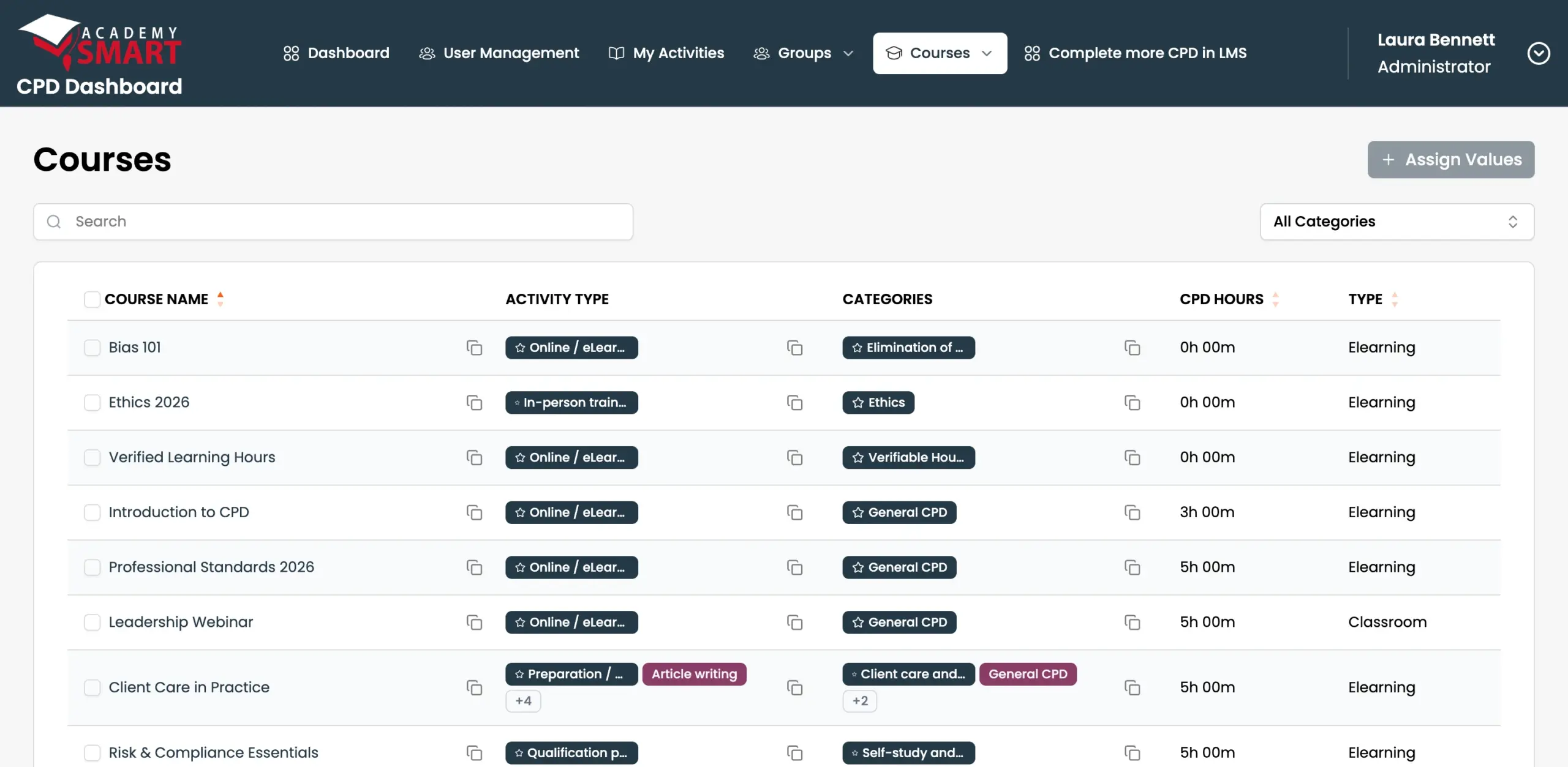
- 1 Synced from your LMSCourses come straight from your LMS catalog.
- 2 Bulk assign CPD valuesSet hours, categories, and types for many courses at once.
- 3 Activity typeHow each course counts: online, in-person, and more.
- 4 CPD categoryWhich requirement each course contributes to.
- 5 CPD hoursHours each completed course adds to the learner’s record.
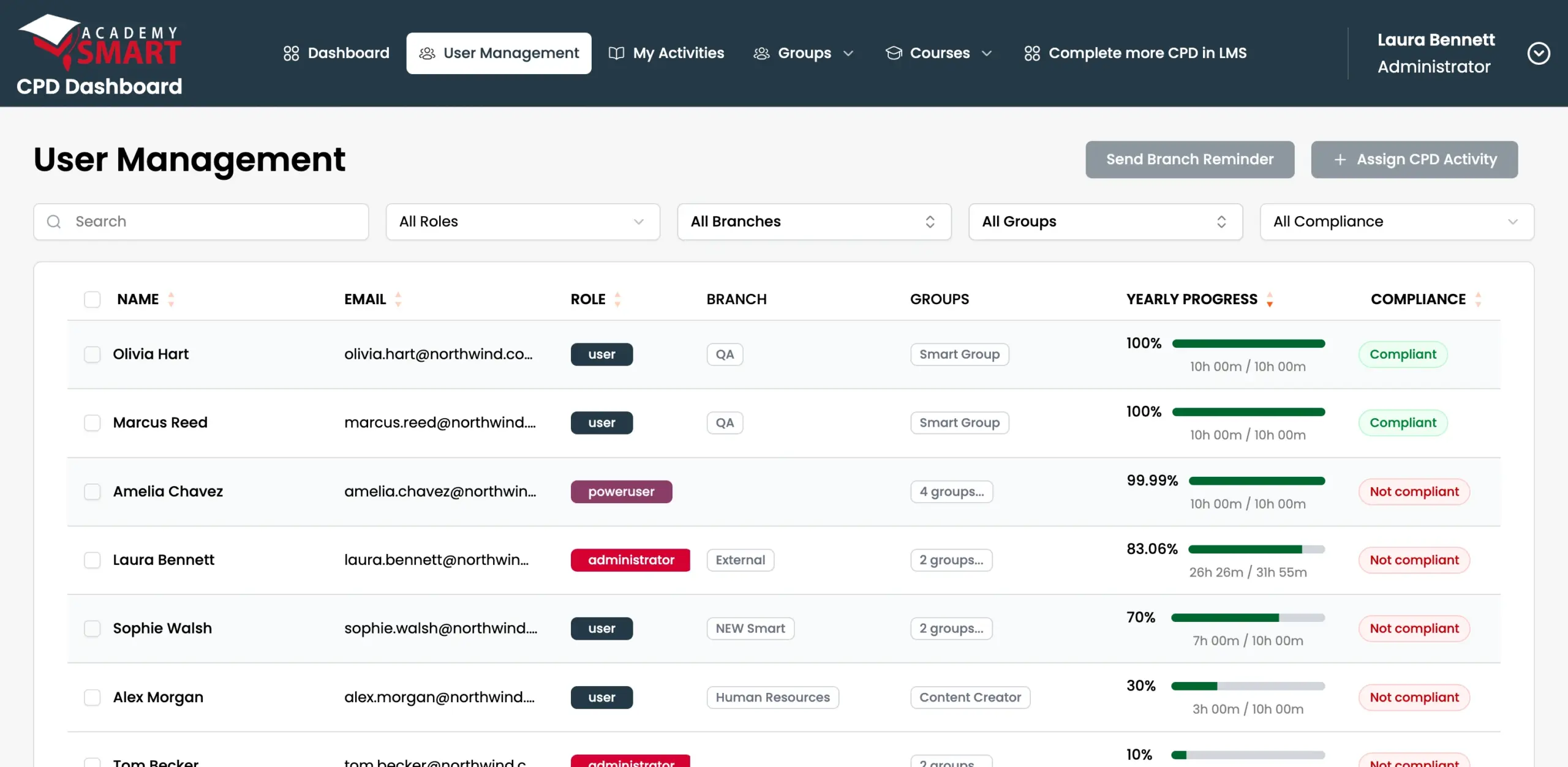
- 1 RemindersSend a reminder to everyone in a branch, or assign an activity.
- 2 FiltersFilter by role, branch, group, or compliance status.
- 3 RolesAdmins, power users, and learners each see what they need.
- 4 Branches & groupsOrganize people by branch, region, and team.
- 5 Yearly progressEach person’s completed hours against their target.
- 6 Compliance statusWho’s compliant, and who isn’t, at a glance.
Everything compliance teams need to track and prove CPD
Keep a complete, audit-ready record of all training across your organization.
Yearly setup
Set CPD hour requirements by role, team, or individual annually.Category management
Create mandatory and optional categories with hour targets.Role-based CPD rules
Employees are tracked against what applies to their exact role.Department & region rules
Set separate requirements by department, region, or unit.Activity tracking
Log courses, workshops, conferences, and self-study.Certificate uploads
Attach proof to every activity so every hour is backed by evidence.Deadline reminders
When deadlines approach, the system notifies people. No chasing required.Progress views
See hours completed, remaining, and time left for every learner on your team.Audit-ready reports
Generate reports by person, team, category, or department.Exports
Filter and export data when you need it. Ready to hand to an auditor.Analytics
See completion rates, gaps, and upcoming risks across all teams.User & team management
Add users, assign roles, group teams, and manage everything in bulk.Your LMS tracks courses. CPD Dashboard proves compliance.
Using LearnUpon or Docebo? You're halfway there
Our CPD Dashboard is natively connected to LearnUpon and Docebo, and adds everything it’s missing: external activities, compliance rules, and a full audit trail. On another LMS? It connects to any platform your company uses.
Manage all CPD tasks in your LMS
Our dashboard connects to any LMS your company uses, plus HR and internal systems.
Built for teams where CPD is mandatory
Regulated organizations
You must show you hold CPD, but right now, that proof lives in spreadsheets.Professional associations
You set the standards your members must meet, but tracking who meets them is still manual.Regulatory bodies
You’re accountable for member compliance across your entire sector and need full visibility.Training providers
Other than courses, your clients need a compliance record that proves what they completed actually counts.Your customized CPD Dashboard is live in weeks
We handle the setup. You start tracking.
Book a call
We look into your CPD requirements, standards, and current setup.We set everything up
We configure initial categories, roles, and rules and deploy on chosen infrastructure.Onboard your team
We import your users and help you set standards and begin tracking.Decide what’s next
Run it yourself or opt into ongoing support for updates and monitoring.Trusted by training providers and regulated organizations worldwide
Check out what they have to say about working with Academy Smart.
Pay once, use it forever
Most CPD platforms charge per seat, so every new employee increases your cost. With our CPD Dashboard, you pay once. Be it 200 users or 2,000 — the price stays the same.
Prefer to spread the cost? Pay monthly or yearly instead. Either way, there are no per-user fees.
Need something beyond the standard setup? We'll scope it on a call and give you an estimate.
CPD Dashboard License
Everything you need to get startedWhy teams trust Academy Smart
Proven LMS expertise, applied to CPD.
50+ LMS projects
We’ve built LMSs for regulated teams, so we’ve seen where they fall short for CPD.LearnUpon Professional Partner
As a LearnUpon partner, we know the platform inside out, so integration is smooth.Pre-built LMS foundation
You’re not starting from scratch. The core system is already built and tested.15+ years in LMS
We understand how training, compliance, and reporting actually work in organizations.What is CPD Dashboard?
CPD Dashboard is continuing professional development (CPD) tracking and compliance software from Academy Smart. It works on top of your existing LMS (native LearnUpon and Docebo sync, other LMS platforms via integration) and keeps one audit-ready CPD record per person: hours, categories, external activities, certificates, and deadlines. It costs $11.5K one-time, $5.5K per year, or $550 per month, with unlimited users.
Is this a SaaS platform? Do we pay per user?
No. CPD Dashboard runs on your own infrastructure, you own it, and there are no per-user fees. Pay once ($11.5K one-time license) or spread the cost ($5.5K per year or $550 per month). The price stays the same whether you have 200 users or 2,000.
How long does it take to go live?
Typically 4–6 weeks from discovery call to launch. That includes setup, configuration to your compliance structure, and onboarding your teams.
Where is our data hosted?
On your own infrastructure: cloud or on-premises, it’s your choice. Nothing lives on our servers.
Can we set different CPD requirements for different roles or departments?
Yes. You can create categories, assign mandatory or optional hours, and apply different rules to individuals, teams, or entire departments.
Can staff log external CPD activities?
Yes: conferences, workshops, self-study, anything. They can add details, upload certificates, and attach notes. It all feeds into the same compliance record.
Does this dashboard integrate with LearnUpon or other platforms?
Yes. It integrates natively with LearnUpon and Docebo: completed courses sync automatically as CPD records. We can connect it with other LMSs and internal systems on request.
What support is included after go-live?
We offer an optional monthly retainer covering technical support, platform updates, monitoring, and bug fixes. You’re not left on your own after launch.
We already have a way to track CPD. Do we need this?
Worth asking: can your current setup track external activities? Does it enforce rules by role or department? Can it produce a full audit-ready report in seconds? If not, the gap is probably bigger than it looks, and at a one-time $11.5K, it’s worth closing.