



Planning an LMS Migration? What to Figure Out Before You Move
Your current LMS might be getting too expensive, missing features your team needs, or struggling to keep up as your business grows.
Whatever is prompting you to consider a move, you’ll need to figure out what should stay and change, and how much work the migration will take.
Take learner records. One company might only need to move active accounts and completion dates. Another might have to preserve years of certification history, including records that its current LMS can’t easily export.
And that’s just one task, with two very different scopes. So how do you figure out what your own migration will involve?
At Academy Smart, we build and extend LMS platforms and migrate companies to them. In this guide, I draw on our experience to walk you through the decisions that affect your migration scope, timeline, and budget, and show you how to put them into an LMS migration project plan your team can work with.
TL;DR
• The same LMS migration task can involve very different amounts of work depending on your existing platform, the data you need to preserve, and the functionality you’re replacing.
• Before planning the move, check your current LMS’s data access, decide what records and content to migrate, and identify the integrations and workflows the new platform must support.
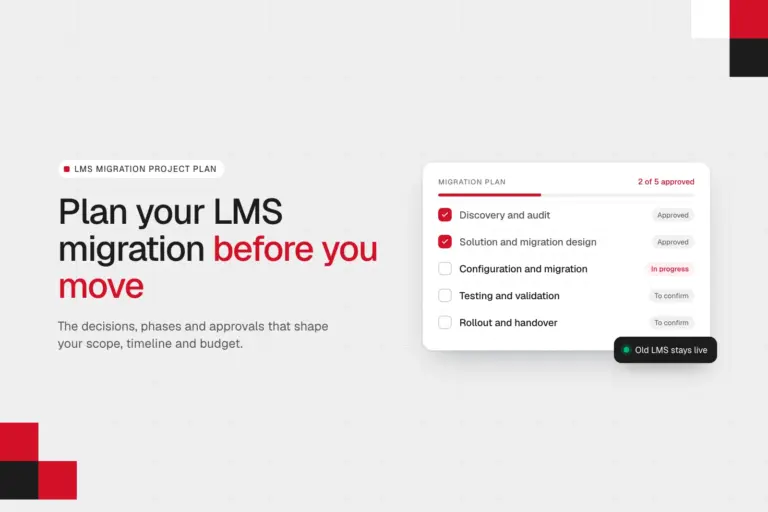
• An LMS migration project typically involves discovery, design, configuration, testing, and rollout. Your L&D and IT teams will need to review requirements and approve key decisions, even if a technical partner handles the implementation.
• You can start your LMS migration project plan before choosing a new LMS. Record your deadlines, initial scope, and requirements first. You’ll confirm the technical approach, timeline, and budget during discovery and design.
Start with why you’re migrating and how much time you have
You might have a long list of things you want to change about your current LMS. But before you get into the details, consider what’s driving the move and how much time you have.
First, why are you migrating?
Think about what’s pushing you to leave your current LMS. For example:
- Your contract is expiring. You need to decide whether to renew, extend, or replace the platform before your contract ends.
- Licence costs are getting too high. You’ll want to compare the new LMS’s ongoing costs with what you’re paying now. Our guide to hidden SaaS LMS costs explains what else to look for beyond licence fees.
- Your LMS can’t keep up with your business. Maybe you’ve outgrown the features your current platform offers, or you’re taking on more corporate clients and need separate learning portals for them.
You may have several reasons for moving. Write them all down so you don’t lose sight of what the new LMS needs to solve.
Second, how much time do you have?
A life sciences organisation I spoke with started exploring LMS alternatives around 18 months before its Adobe contract expires in April 2028. Its three-person L&D team was already running a systems gap analysis.
Compare that with an education recruitment agency with 230 LMS users. When we spoke, its contract was ending that very month, and the L&D lead was still deciding what platform the business needed. She’d already asked the current vendor to extend the contract for a couple of months.
Both teams were exploring alternatives, but they had very different amounts of time to make a decision. So check your contract expiry date, renewal terms, and whether a short extension is possible. Also note any business deadlines that could affect when you switch platforms, such as an upcoming mandatory training cycle or a new program you’re launching for customers.
Third, when would you like to go live?
Use those deadlines to set an initial target. Based on our experience at Academy Smart, I’d allow at least 6 months for a custom LMS project or around 3 months for a move to another SaaS platform as an early planning reference.
Keep that date provisional. You’ll need to assess the data, integrations, and development work involved before you can confirm whether it’s achievable.
Next, let’s look at what your migration needs to cover.
What does your LMS migration need to cover? 5 decisions to make
Before you can estimate the time and budget for your LMS migration, you need to understand what the work will involve.
For example, one of the first things I ask during discovery is how many users you have, which training records you need to preserve, and what your current LMS needs to do. The answers help us assess the work involved.
Based on that, here are five things I’d look at first.
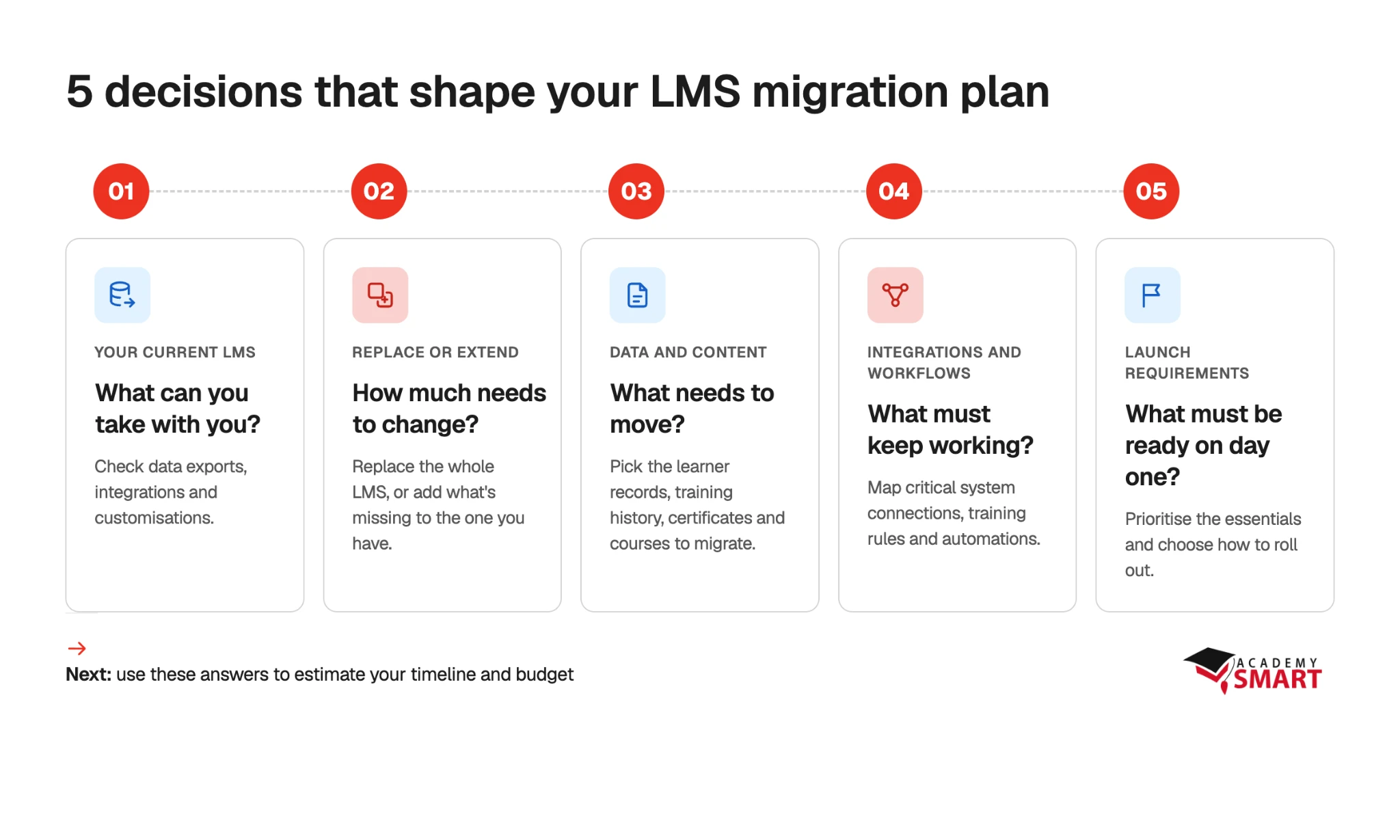
You can start gathering this information now, with your L&D and IT teams, even if you haven’t chosen your next LMS. As for technical details, for example, how to extract legacy data or build the integrations you need, you’ll need to do a technical assessment with the team handling your migration.
#1. What does your current LMS let you export?
Check what data you can export from your existing LMS and in what format. This depends on the type of platform you’re leaving:
| Your current LMS | What to investigate |
|---|---|
| SaaS LMS, such as TalentLMS or Docebo | Available exports, API access, vendor restrictions, and whether you can extract historical learning records |
| Open-source LMS, such as Moodle | Custom plugins, modifications, and how the existing data structure maps to the new LMS |
| Custom-built LMS | Legacy database structures, undocumented workflows, and integrations that may need reverse-engineering |
If you’re leaving a SaaS LMS like TalentLMS, LearnUpon, or 360Learning, check what data you can export and in what format. For example, you might be able to export learner profiles but find that completion dates or certification history aren’t included. You’ll then need to check whether that information is available through an API or from your vendor. If it isn’t, you’ll have to decide how to preserve those records.
If you’re migrating from open-source LMS, look into the plugins and customisations you’ve added over the years. What does each one do, and do you still need that functionality? Some features may already be available in a new LMS, while others will need to be rebuilt. This affects how much development work to include in the plan.
If you’re leaving a custom or legacy LMS, check how well its data structures and workflows are documented. If nobody knows how a course assignment rule works, for example, your development team will need to investigate it before designing the replacement. Account for that investigation when estimating the project.
Add to your migration plan: Ask your current LMS provider for a sample data export and review it with your IT team or migration partner. Record which data you can access, in what format, and any gaps that need investigating before you can estimate the migration work.
#2. How much of your existing learning setup are you replacing?
Moving to a new LMS doesn’t necessarily mean replacing everything around it. You might want to keep your learner-facing website, content library, or some of the tools connected to your current platform.
For example, a US online-learning business I spoke with uses WordPress and LearnDash, and had other tools connected through plugins. They were exploring a dedicated LMS backend while keeping their existing WordPress frontend.
Or say your platform handles course delivery and learner management well, but you need a better way to track CPD hours or connect training records to your HR system. In that case, you could keep the existing LMS and add the missing functionality. We’ve done this kind of work through custom integrations and solutions such as Academy Smart CPD dashboard, which connects natively to LearnUpon and Docebo.
That said, identify which parts of your current setup will stay and which need replacing. You may find that extending your existing LMS is enough, or that only certain parts of your learning setup need to change.
Add to your migration plan: List the components you’ll replace and those you’ll retain, including any existing portals, content libraries, and connected tools.
#3. Which data and content needs to migrate?
Once you know which parts of your learning setup you’re replacing, decide what data and content needs to move with them.
Start with learner records. Will you migrate only active users, or preserve the history of former employees too? Which completion records, certificates, assessment scores, and learning progress do you need? If your business must prove that employees completed training years ago, those historical records need to remain accessible.
Then look at your courses. Do you need to migrate every one of them? For example, a life sciences organisation I talked to had turned off an entire external course library because learners found the amount of content overwhelming. The team was now focusing on offering more relevant courses.
Add to your migration plan: Specify which learner groups and types of training records you’ll migrate. Record which courses need migrating, updating, or retiring, and flag any that require conversion. For archived records, note where they’ll be stored and how you’ll access them.
#4. Which integrations and business do you need to preserve?
Now that you’ve looked into what data to migrate, consider how the new LMS will use it. Which workflows and connections to other systems need to keep working?
Take a shipping company. It manages training for more than 4,000 crew members, who regularly leave and return. The company needs to deactivate their accounts without losing training history and automatically reassign courses a month before their certificates expire.
They need to transfer the records and make sure the new LMS supports account deactivation and automatic course reassignment. We look at these rules during discovery, along with any manual workarounds your LMS administrators have developed over time.
So review how your current LMS assigns training, manages learner access, and handles certificate renewals. Identify any manual workarounds worth improving.
Do the same for LMS integrations. Which systems exchange data with your LMS, what information do they share, and how often? For example, if your HR system updates employee roles, the new LMS may need that information to assign the right courses.
Add to your migration plan: List the integrations and business rules the new LMS must support, including any workflows you want to improve. Flag connections that need rebuilding or testing.
#5. What must be ready at launch?
Finally, decide what your team can’t do without at launch of your new LMS and which functionality can follow later.
For example, if employees rely on the LMS for mandatory compliance training, access to those courses and accurate completion records should be ready on day one. A new reporting feature could follow later.
Prioritising features this way can help you launch sooner. At Academy Smart, we offer a pre-built LMS foundation with core functionality already developed, which we can customize to your requirements. That gives you a starting point for building the features you need — and room to add others later.
Also, consider whether training needs to remain available throughout the migration. If it does, your implementation partner will need to plan how to move learners to the new platform without interrupting their training. For example, our team uses a Zero-Downtime LMS Migration Path: we prepare the new LMS while the old one stays operational, keep the data in sync, and validate the new platform before switching over. I explain this approach in more detail in the next section.
Add to your migration plan: List your day-one requirements and features that can follow later. Note whether training must remain available throughout the migration, so your migration partner can account for it when designing the rollout.
Break the migration into phases, deliverables, and approvals
Once you know what your migration needs to cover, the next question is how to get it done. What needs to happen first? When will your L&D and IT teams need to get involved? And what should they check before the project moves forward?
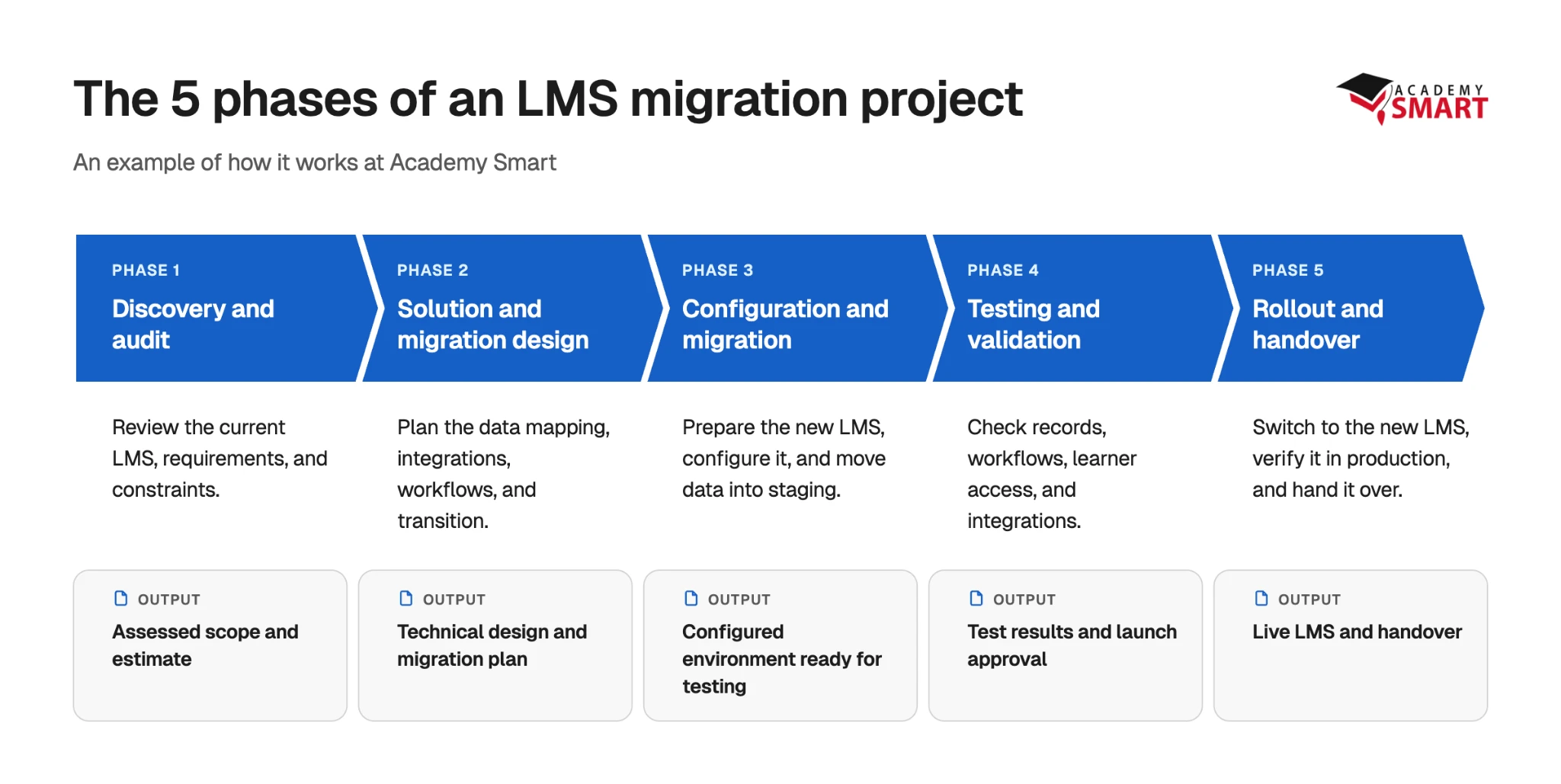
To make this easier to picture, I’ll use Academy Smart’s LMS migration process as an example and break the work into five phases. For each, I’ll explain what happens, who’s involved, and what needs approval before moving on.
Phase 1. Discovery and audit
During discovery, the implementation team checks your initial scope against the actual LMS. For example, if you want to preserve five years of completion history, they need to establish how those records are stored and whether they can be exported.
Who’s involved: L&D explains training requirements and business rules. IT provides system access and technical information. The migration partner investigates the source platform and estimates the work.
Deliverable: Assessed migration scope and project estimate.
Approval checkpoint: L&D and IT review the scope, exclusions, and outstanding questions before design begins.
Phase 2. Solution and migration design
With the scope defined, the team plans how the migration will work.
For example, if you’re moving historical completion records and certificates, the team needs to map that data to the new LMS. They’ll also design how your required integrations and business rules will work, along with the transition from the old platform.
At Academy Smart, this phase produces a technical design document with security and compliance requirements and a Zero-Downtime LMS Migration Path. It explains how we’ll move learners to the new platform. More on that in phase 5.
Who’s involved: The implementation partner prepares the technical design. Your IT team reviews integrations, access, and security requirements, while L&D confirms that the proposed workflows meet the business’s needs.
Deliverable: Technical design document and migration plan.
Approval checkpoint: Have your L&D and IT leads review the design, data mapping, and proposed transition before development begins.
Phase 3. Configuration and migration
Now the team can start building or configuring the new LMS according to the approved design. This includes setting up user roles and permissions, developing any custom functionality, and connecting the systems you’ve decided to keep. Meanwhile, your L&D team can prepare the courses and records for migration, including any content that needs updating or converting.
We prepare the new LMS in a staging environment using real data while the old platform stays operational. This gives us a place to check the migrated records and functionality before learners switch to the new system.
Who’s involved: The implementation partner handles the technical implementation and data transfer. IT provides access to connected systems, while L&D helps prepare content and clarifies any questions about learner records or training rules.
Deliverable: A configured LMS in staging, with the agreed functionality and data ready for validation.
Approval checkpoint: Confirm that the staging environment is ready for testing, including the required records, courses, and integrations.
Phase 4. Testing and validation
With the new LMS ready in staging, your team checks that the migrated data and functionality work as agreed.
This means verifying learner records, course content, permissions, and integrations. Test critical workflows too. Remember the shipping company that needs to keep training history when crew members leave and return? A useful test would be to deactivate a sample account, reactivate it, and check that its training records are still there.
At Academy Smart, we also verify completion records, certificates, and learning progress before go-live. The client’s team tests the platform and signs off before the switch.
Who’s involved: The implementation partner supports testing and fixes technical issues. L&D and LMS administrators check learner records and training workflows. IT checks integrations, access, and security-related requirements.
Deliverable: Documented test results and client approval to proceed.
Approval checkpoint: Have the business and technical leads confirm that critical data and workflows meet the agreed acceptance criteria. Resolve any issues that would prevent launch before approving the cutover.
Phase 5. Rollout and handover
Once you’ve approved the new LMS for launch, the team prepares the production switch. This is where we follow our Zero-Downtime LMS Migration Path:
Mirror → Sync → Validate → Switch → Retire.
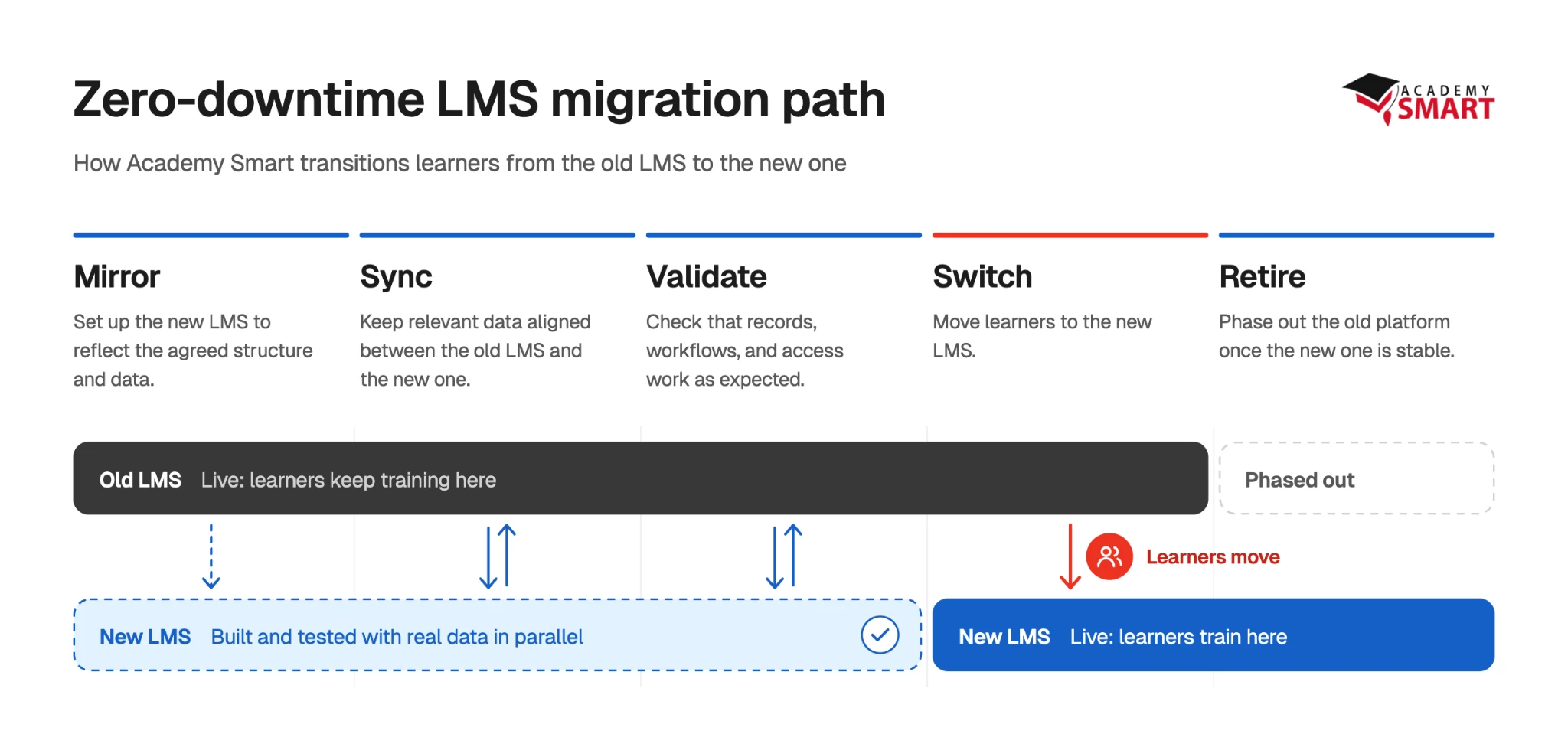
The old LMS stays operational while we prepare the new one, keep learner data in sync, and check that everything works. We then move users to the new platform in stages.
We’ve used a similar continuity-first approach for Teachers of Tomorrow. We built a custom portal around LearnUpon and moved more than 25,000 users to it without interrupting their training. LearnUpon remained the course-delivery platform, so this was a portal migration rather than a full LMS replacement.
After the switch, the team checks that learners can access their courses and the agreed workflows work in production. The old LMS can then be retired according to the cutover plan, and the client receives documentation and handover support.
Who’s involved: The implementation partner coordinates the technical switch and handover. IT supports production access and integrations, while L&D checks that learners can continue training.
Deliverable: New LMS in production, completed handover, and old-platform retirement according to the agreed plan.
Approval checkpoint: Confirm that the required production checks have passed before retiring the old LMS.
Recap of 5 phases
Here’s how the work and responsibilities could be divided across the five phases. The exact split will depend on your team, the implementation partner, and how complex the project is.
| Phase | Who does what | Deliverable | Who reviews or approves |
|---|---|---|---|
| 1. Discovery and audit | Technical partner audits the LMS. L&D explains training requirements. IT provides technical access. | Assessed scope and project estimate | L&D and IT leads |
| 2. Migration design | Partner designs data mapping and technical approach. IT reviews integrations and security. L&D confirms workflows. | Technical design and migration plan | L&D and IT leads |
| 3. Configuration and migration | Partner builds the new LMS and transfers data. IT supports integrations. L&D prepares content. | Staging environment ready for testing | IT and LMS administrator |
| 4. Testing and validation | L&D checks training records and workflows. IT checks technical requirements. Partner supports testing and fixes issues. | Test results and approval to proceed | Named business and technical leads |
| 5. Rollout and handover | Partner coordinates cutover. IT supports production systems. L&D verifies training access. | Live LMS and completed handover | Designated go-live approver |
How much time and budget should you allow for an LMS migration?
And now for everyone’s favourite part of project planning: timelines and budgets.
How much time and money you’ll need depends on the work involved. Here’s what I’ve seen make the biggest difference in Academy Smart’s projects.
What can affect your LMS migration timeline and budget?
| Factor | Timeline | Budget | Why |
|---|---|---|---|
| Data volume and condition | Can increase | Can increase | More records to transfer, or incomplete data to clean and verify, can mean more work. |
| Access to the existing LMS | Can increase | Can increase | Limited exports, missing documentation, or custom data structures can require additional investigation and extraction work. |
| Integrations and custom workflows | Can increase | Can increase | Connections and business rules may need configuration, development, and testing. |
| Vendor responses and internal approvals | Can delay | Sometimes | If your current LMS provider is slow to supply data or access, or your team delays approvals, the project takes longer. You might also have to pay to keep your old LMS running. |
| Keeping both LMSs operational | Can affect | Can increase | The team may need extra synchronisation and cutover checks, while overlapping subscriptions or hosting can add costs. |
| Hosting and ongoing support | Usually no direct effect | Yes | These are costs of operating the new LMS after launch. |
You’ll need a technical assessment from your technical partner to know how much these factors affect your particular project.
How long does an LMS migration take?
When people talk about LMS migration, they may mean the whole project of moving to a new platform, including development or configuration, or just transferring the data.
At Academy Smart, most LMS projects take around 3–6 months, including discovery, design, development, and testing. The actual data migration usually takes place during the final 4–6 weeks of the build.
So if your contract expires in two months, you can’t assume the replacement will be ready just because the data migration takes four weeks. You still need time to prepare and test the new LMS.
These figures can give you a starting point. Once we’ve assessed your existing platform and requirements, we can give you an exact timeline for your project.
How much should you budget for an LMS migration?
Moving to a new LMS involves more than transferring records. Your overall project budget will include developing or configuring the new platform, migrating data and content, and building integrations. You’ll also need to account for hosting, support, and any costs of keeping both LMSs running during the transition.
At Academy Smart, we provide a fixed-price quote for LMS migration after discovery. We also offer up to 100 hours of free migration work covering users, groups, SCORM packages, and completion history. This covers part of the data-transfer work, while development and other project requirements are priced according to the agreed scope.
Add to your migration plan: In your project overview, record your available budget, current LMS costs, and provisional go-live date. Mark the estimated project cost and timeline as To confirm. Update them once your migration partner has assessed the work.
Put it all together in an LMS migration project plan
By now, you have enough information to start putting your migration plan together. Some details, like the exact timeline, cost, and technical approach, will only become clear during discovery. So start with what you know and fill in the rest as the project takes shape.
What should your plan include?
I recommend building your plan in two stages: start with the information you already have, then fill in the technical details with your technical partner.
You can start filling it in before you’ve chosen a replacement LMS. As discovery and design progress, you’ll replace assumptions with confirmed details.
| What to include | Before discovery: What you can prepare | During discovery and design: What to confirm |
|---|---|---|
| Deadlines and timeline | Contract expiry, renewal terms, provisional go-live date | Project milestones, estimated durations, realistic go-live date |
| Migration scope | Data and content to preserve, existing systems, critical workflows, day-one requirements | What can be migrated, what needs building, and any exclusions |
| Budget | Available budget and current LMS costs | Project quote, transition costs, and ongoing expenses |
| Responsibilities | Your L&D, IT, and business contacts | Owners and approvers for each milestone |
| Dependencies and risks | Known issues, such as missing exports or contract deadlines | Technical dependencies, possible delays, and contingency plans |
| Testing and approvals | What must work when the new LMS goes live | How you’ll test it, who signs off, and what happens if a critical check fails |
Use our LMS migration project plan template
To help you put everything together, I created a Google Sheets template with the five migration phases laid out. It also has space for your scope decisions, deadlines, budget, responsibilities, dependencies, and approval criteria.
Open it and select File → Make a copy to save your own editable version.
Start with the dates and requirements you already know. Mark anything you’re unsure about as To confirm. Then keep updating the same sheet as the project moves forward.

Get a free LMS migration audit
Wondering how much work your LMS migration will involve? At Academy Smart, we offer a free consultation where we look at your current setup, discuss what needs to move or change, and identify anything that needs further investigation.
Bring your current LMS, your deadline, and your questions, and we’ll help you work out where to start. Get a free LMS migration audit.