



How to Build a Custom LMS: A 6-Month Roadmap

Every team that decides to build an LMS from scratch hits the same challenges in the first month. Do you write your own SCORM engine? Fork Moodle? Hire six engineers and hope?
Standish Group’s long-running research on software delivery found that only 31% of projects ship on time, on budget, and on scope. For large-scale builds, that success rate drops below 10%. If you want to know how to build an LMS from scratch, you have to consider those odds.
If you want to learn how to create an LMS, from our team’s perspective, you have to treat 80% of the system as already solved and spend your real engineering hours on the 20% that makes the platform yours. And we’ll show you how we do it for our clients.
We are Academy Smart, a software development agency that’s been building LMS since 2009. In this article, we’ll share five layers to scope, a delivery model that can save up to 80% of budget, and a migration path that doesn’t take your users offline.
TL;DR
Scope the build across five layers: architecture, standards, data, integrations, operations.
Most of an LMS doesn’t need to be invented. The 80/20 LMS Delivery Model treats users, courses, roles, SCORM, reporting, and multi-tenancy as solved, and puts your engineering time into the 20% that’s specific to your business.
Realistic timeline: 6 to 7 months, against the 12 to 18 months a from-scratch build usually takes. When the custom scope is narrow, it compresses further.
A one-time build in the $85K–$120K range, plus $550–$1,700 a month in ongoing support.
Migrating existing learner data doesn’t have to mean downtime. A phased approach keeps the old system running until the new one’s proven.
Where to start when you’re scoping the architecture
Before anyone touches a framework or a cloud provider, your project needs to be scoped across five layers.
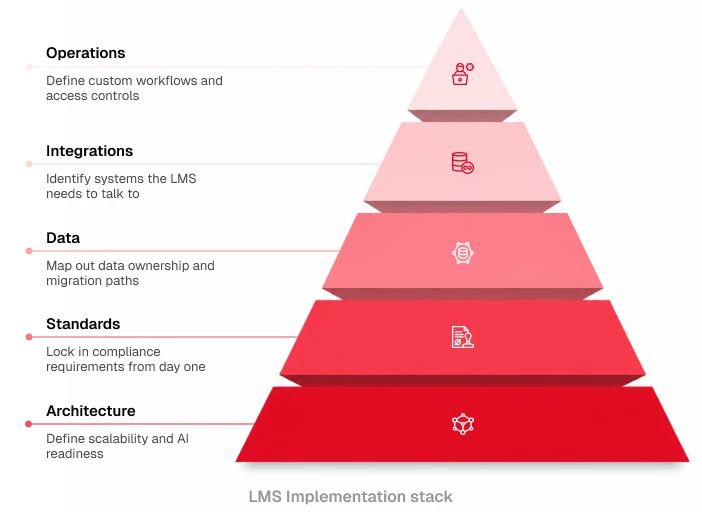
The 5-Layer LMS Implementation Stack breaks the scope into:
- Architecture → Define scalability requirements, AI readiness, and whether you need a multi-tenant setup to support multiple companies or franchises with isolated data and branding.
- Standards → Lock in the exact compliance requirements from day one: SCORM 1.2, SCORM 2004, xAPI, cmi5, and LTI (1.1, 1.3, Advantage). Retrofitting a standard after launch is expensive; scoping it upfront is not.
- Data → Map out data ownership, migration paths, and reporting needs before you design a single schema.
- Integrations → Identify every system this LMS needs to talk to before you pick a backend.
- Operations → Define custom admin workflows, role-based access controls, and automated reporting needs.
The AI readiness in the Architecture layer isn’t theoretical. LMS vendors are racing to bolt AI features onto platforms that weren’t built for it.
If you’re scoping this yourself, decide now whether your data model, integrations, and architecture can support AI-driven features later. Clean data and modular architecture cost almost nothing extra to design in at this stage, and a great deal to add afterward.
Pick a tech stack that won’t paint you into a corner
With the five layers scoped, the stack decisions get more concrete.
- Architecture → Define scalability requirements, AI readiness, and whether you need a multi-tenant setup to support multiple companies or franchises with isolated data and branding.
- Standards → Lock in the exact compliance requirements from day one: SCORM 1.2, SCORM 2004, xAPI, cmi5, and LTI (1.1, 1.3, Advantage). Retrofitting a standard after launch is expensive; scoping it upfront is not.
- Data → Map out data ownership, migration paths, and reporting needs before you design a single schema.
- Integrations → Identify every system this LMS needs to talk to before you pick a backend.
- Operations → Define custom admin workflows, role-based access controls, and automated reporting needs.
Backend
Node.js, PHP/Laravel, or .NET, depending on your team’s existing expertise. There’s no single right answer here, but the wrong answer is picking a stack your team has to learn from scratch mid-project.

The learning engine
custom SCORM and HTML5 engines capture granular progress, quiz results, and completion data without leaning on third-party plugins that break on every update.

Frontend
Vue.js or React both give you the component reusability a multi-tenant LMS needs. React holds the wider lead in raw adoption (recent developer surveys put it near 70%, against Vue’s 45%), but Vue’s gentler learning curve and lighter footprint are the reasons why companies like GitLab and Alibaba run it at enterprise scale.

Cloud infrastructure
AWS (still the market leader at roughly 28–31% of global cloud spend) or Google Cloud Platform (closer to 12–14%, but growing revenue faster than either AWS or Azure) for high availability, Docker for containerization, PostgreSQL for a database that scales with reporting complexity.

That last point is worth sitting with. Spend ten minutes on Moodle’s own community forums, and you’ll find years of the same complaint on repeat: a SCORM package that worked fine for months suddenly stops tracking completions after a routine platform upgrade, and the fix is usually to recompile the package and hope.

I am having the same exact issue. It is not reporting the scorms as completed, and I cannot save the minimum passing score.
Have you figured out a work around, or has Moodle resolved this issue yet?
Docebo’s user community has nearly identical threads. Completions fail on certain browsers, and support teams manually reset learner records because nobody can pin down the cause. That’s not a Moodle problem or a Docebo problem specifically. It’s what happens anywhere a learning engine sits on top of someone else’s plugin architecture instead of being owned outright.
This is why Cyber Inc, a security awareness training provider, decided to treat the learning engine as core intellectual property rather than a plugin decision. Academy Smart built for them a custom SCORM and HTML5 engine that captures progress, quiz results, and completion data natively, working seamlessly for learners, managers, and admins inside the same system.
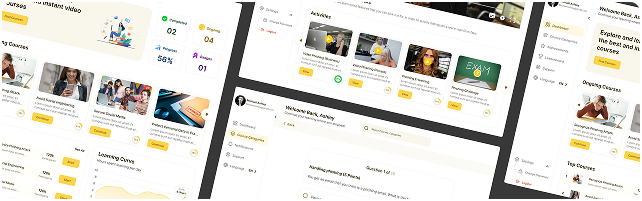
Results:
- No third-party player to debug after an upgrade
- 5 months from idea to first release
- 86 companies actively use the platform
- 68% cost reduction compared to SaaS
Building your own engine is the first real test of whether you’re following the 80/20 approach below, or rebuilding the entire 100%.
The 80/20 rule that gets you shipped in months instead of years
The 80/20 LMS Delivery Model splits the build into two categories:
The 80%: deploy, don’t rebuild. User management, course delivery, reporting, roles, and the SCORM engine are solved problems. Every week your team spends rebuilding them is a week not spent on what makes your platform different.
The 20%: this is where your engineering time belongs. Custom business logic, monetization workflows, and specialized features like CPD tracking with role-based and region-based rules. This is the part no off-the-shelf platform will ever build for you, because it’s specific to your business model.
pre-built foundation
Use existing solutions for common LMS functions
custom business logic
Focus engineering time on unique business needs
Skipping this split is how large builds turn into the projects the industry loves to write case studies about. Research from McKinsey and Oxford on large IT projects, those with budgets over $15 million, found they run 45% over budget and 7% over schedule on average, while delivering 56% less value than promised. That’s the cost of treating the full 100% of an LMS as something that needs building from the ground up.
At Academy Smart, we save our clients’ time and budget by using the 80/20 LMS Delivery Model. Here’s what the model delivers in practice. One of Ireland’s leading corporate law firms needed CPD compliance tracking that their LMS couldn’t provide. 80% of the solution already existed as a ready-made CPD foundation, so we focused on what was specific: multi-level compliance rules by seniority, a pro-rata adjustment system for individual circumstances, and real-time dashboards for learners, managers, and admins.
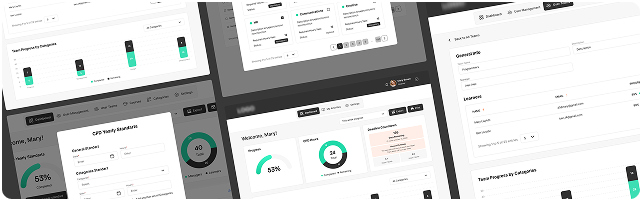
We delivered the required functionality in 2 months. Six hundred solicitors now have real-time visibility into their compliance status, and external CPD activities that previously lived in spreadsheets count automatically.
The teams that hit these timelines are moving faster because they’re only building what’s really custom. And one of the custom 20% you need to think of in advance is integrations
Wiring up the integrations your LMS needs
An LMS that doesn’t talk to the rest of your stack becomes an island, and someone on your team has to manually copy-paste between systems that should sync automatically.
Here are the main integrations:
- API middleware → Build reliable, API-based middleware to handle complex business logic outside the core LMS. This keeps the platform from breaking every time one connected system pushes an update.
- HR and directory syncing → Webhooks and integrations with identity providers like Azure Active Directory or HRIS platforms like BambooHR automate user creation, onboarding, and role assignments.
- CRM, AMS, and payments → Connections to Salesforce, Personify AMS, or Stripe automate course access on membership upgrades, purchases, or renewals — no manual provisioning.
- Data visualization → Funnel completion data directly into BI tools like Power BI via API for enterprise-level reporting without a spreadsheet in sight.
To give a real-life example, Cyber Inc’s platform integrates SAML 2.0 for secure authentication, Microsoft Graph for automated user and role management, and Power BI for enterprise reporting. This combination lets 86 companies run isolated, with branded environments and without an admin manually provisioning any of them.
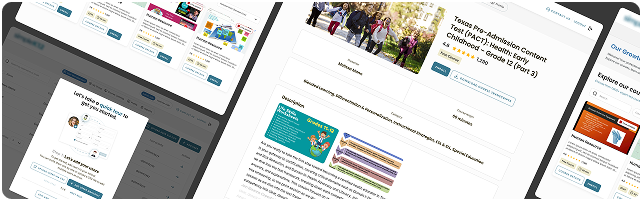
For Teachers of Tomorrow, we solved a different integration problem: unifying B2C and B2B users across Azure AD, LearnUpon, and Stripe in a single custom portal, with automated course catalog sync, so a teacher buying a course individually and a district enrolling a cohort flow through the same system without duplicate records.
Now, let’s talk about costs, as that’s always the most important part.
What a custom build costs
At Academy Smart, we have transparent pricing that you can consult right away. But whatever vendor you choose, there will be two price tags:
Cost forecasting
Budget realistically for a custom enterprise LMS: a one-time capital expenditure typically in the $85K–$120K range for the initial delivery.
Ongoing maintenance
Predictable support costs, typically $550–$1,700 a month for updates, monitoring, and continuous improvement is a number you can plan around, unlike the unpredictable maintenance bill of an open-source system.
That predictability matters, because “free” is doing a lot of work in most “build lms from scratch” conversations. An open-source platform like Moodle has no license fee, but the total cost of running it rarely stays at zero. Upgrade friction turns every major version bump into a multi-week engineering project. Three years in, that “free” platform’s total cost of change often catches up with (or exceeds) a comparable SaaS contract or a custom build price.
If you’re weighing the numbers against a SaaS renewal, run them through our SaaS vs. Custom LMS ROI Calculator.
Finally, we have to mention the last challenge, which is migration.
Moving your data without taking learners offline
A new LMS is only as good as the data that survives the move into it. This is the step most timelines underestimate, and the one most likely to go wrong in public.
First, companies have to normalize data. Audit and clean legacy data before you transfer anything.
Then execute the phased approach.
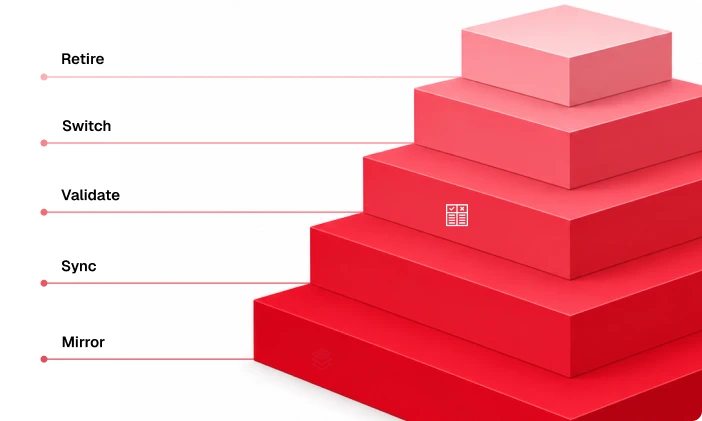
The Zero-Downtime LMS Migration Path breaks the cutover into five stages:
- Mirror → Run the new LMS in parallel with the legacy system.
- Sync → Keep user profiles, progress data, and completions continuously aligned across both platforms.
- Validate → Test data accuracy and core workflows with a select group of real users before anyone else touches the new system.
- Switch → Move user traffic over in stages, not all at once.
- Retire → Decommission the legacy platform only once the new environment has proven stable.
The caution is worth it. This year, the group behind the Instructure/Canvas breach claimed to have taken 3.65TB of data, potentially touching records for up to 280 million people.
Whatever the eventual scope of that incident turns out to be, the point stands regardless: when your learner data sits on a platform you don’t control, someone else’s breach becomes your incident to manage too. A phased migration is the first exercise in owning your data, rather than renting access to it.
This is the path Teachers of Tomorrow followed when moving 25,000+ learners onto their new custom portal — all users migrated with zero disruption to ongoing training.
Custom doesn’t have to mean from scratch
The temptation is always to treat a custom LMS as one giant, from-scratch undertaking. But you can build it in 6 to 7 months if your team deploys the 80% that’s already solved, and spends real engineering time only on the 20% that’s actually custom.
If you want a second set of eyes on your architecture before you commit engineering time to it, Academy Smart’s LMS software development services start with a Free LMS Usability & Tech Audit. It has no cost and requires no obligation. Just contact us, and we’ll be glad to talk.