




How to Walk Into a Budget Meeting With LMS ROI Your CFO Will Approve

Every LMS ROI article treats the CFO like the person standing between you and approval. Beat the boss, unlock the budget.
That’s the wrong game.
Your CFO isn’t trying to kill your LMS project, but rather avoid another software investment that runs over budget or costs twice as much to maintain three years from now. Chances are, past experience has taught them to ask tough questions.
So don’t try to outargue them. Walk into the meeting with the answers they’re looking for. Show when the investment pays back and what the business loses by keeping the current LMS. This article helps you find the right words. And, more importantly, the right numbers.
Keep reading to see the frameworks and talking points that build a business case your CFO won’t dismiss in the first five minutes. Because once the numbers make sense, the conversation changes.
TL;DR
The invoice is 20% of what your SaaS LMS costs. The other 80% covers admin hours, workarounds, missing features, roadmap delays, and compliance risk that sits below the waterline.
The ROI formula is standard, but the inputs matter. Build each side honestly: real costs (including hidden ones) + real benefits (costs eliminated, time recovered, revenue enabled, risk removed).
In a SaaS vs custom LMS cost comparison, year one belongs to SaaS. By year three, custom wins.
You don’t have to switch LMS tomorrow. There are signs that you have outgrown SaaS, like rising per-user costs, missing features, and a roadmap you don’t control.
To prove an LMS business case to your CFO, you need specific numbers you can defend when questioned.
Why standard LMS ROI calculations fail
Most LMS ROI calculations begin with the same math. L&D teams put the subscription fee on one side of the ledger and the training savings on the other. Then they subtract and hope the number looks good to survive a budget meeting. But that math ignores the biggest part of the bill, and CFOs notice it immediately.
And even the subscription line, the number everyone thinks they know, is negotiated behind closed doors. Two companies of the same size can pay wildly different amounts for the same platform. And that invoice, whatever it says, only shows the visible layer.
The LMS cost behind the waterline
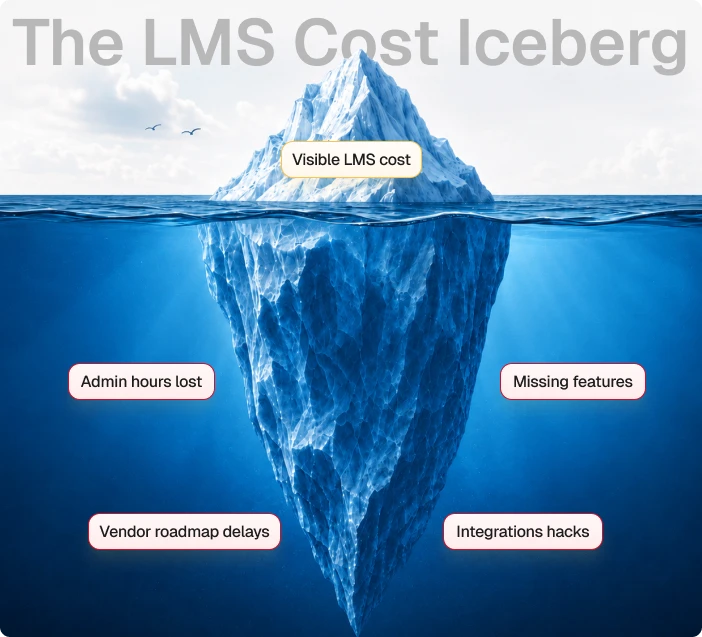
We map LMS spend against a framework we call the LMS Cost Iceberg. The visible 20% covers subscription fees, implementation costs, or per-user licenses. Every ROI calculation is usually built around it.
The other 80% sits below the waterline, and it’s the part CFOs care about:
- Admin hours lost to manual workarounds → Time spent exporting data, fixing records, and building reports by hand.
- Missing enterprise features → Work the platform can’t do, so your team does it instead.
- Integration hacks → Extra tools and custom code that keep disconnected systems talking.
- Vendor roadmap delays → Your business priorities wait for someone else’s release schedule.
You won’t find any of this in the invoice, but all of it affects the bottom line. And in regulated industries, that hidden layer carries one more cost item.
The compliance cost that only shows up during an audit
Every hidden cost so far has been about hours, workarounds, and features that don’t ship. Compliance risk works differently. It can sit unnoticed for years, then arrive all at once.
Off-the-shelf LMS platforms are built to track what happens inside them. They handle course completions, quiz scores, and enrollment records. But they can’t track training that happens outside them. All of that lives in spreadsheets and email chains until an auditor asks for it.
When an auditor requires those records, someone has to pull everything together manually. If the evidence is incomplete, the business may face remediation work, penalties, or reputational damage. Those costs don’t appear in the contract, but they’re part of the platform’s true cost of ownership, and they also belong in your ROI calculation.
Once you know what to count, the formula becomes the easy part. But it still needs good inputs.
The LMS ROI formula with the parts everyone forgets
The standard ROI formula hasn’t changed. It’s still just as boring:

Both Total Benefits and Total Costs are estimates. That’s fine as the CFO isn’t looking for perfect precision. They need reasonable assumptions backed by evidence. Here’s how to build each side of the formula so it holds up.
Price the total costs and how to calculate them honestly
To keep the math credible in the eyes of your CFO, Total Costs has to reflect real numbers. They look a little different depending on the type of platform.
For a SaaS platform, that means the subscription plus every hidden line item from the section above: admin hours, workarounds, integration patches, add-on modules, tier upgrades over three years.
For a custom LMS, it’s a fixed build cost plus the ongoing support retainer. With Academy Smart, for example, you pay around $17K for a starter LMS or $85K – $120K for a custom build.
For an open-source LMS like Moodle, the license is free, but you have to pay for hosting, ongoing upgrades and security work, custom plugin development, integrations, and more. We call it the Total Cost of Change, the framework we use to price everything that keeps free software running once the free part is over. It covers:
Upgrade friction
Every major version bump becomes a project. What was free becomes six weeks of engineering time twice a year.

Plugin conflicts
When one plugin’s update breaks another, and there’s no vendor to escalate to. Someone on your team owns the debug cycle.

UX debt
Everyone agrees the interface needs work. Nobody has time to do it because maintenance always comes first.

Developer onboarding
The person who set up the platform will eventually leave. The next developer needs three months to understand what was built and what will break if they touch it.

Rewrite cycles
Every few years, an accumulated pile of workarounds and plugin patches has to be rebuilt. Free software, paid rebuild.

An open-source license is free, but over three years, the total cost of running it often catches up with a comparable SaaS platform. In some cases, it even approaches the cost of a custom LMS without giving you the same level of ownership or flexibility.
Whichever platform you’re quantifying, plug the whole cost picture into the formula’s denominator. A $25K/year SaaS contract that needs 15 hours a month of admin workarounds isn’t a $25K investment. Add those hours back in, and the Total Costs climbs.
Translate benefits into dollars
The Total Benefits section usually gets filled with learning metrics. Those metrics matter, but they don’t answer the question finance asks. A CFO wants to see saved hours, reduced costs, gained revenue, or removed risks. So, for an LMS decision, break Total Benefits into four buckets:
1. Costs you no longer pay
Start with the easiest numbers. What expenses disappear once the new LMS is in place? That might be your current SaaS subscription, per-user license fees, premium modules, or annual tier upgrades. These savings require very little debate because they’re backed by invoices.
2. Time you get back
The hidden 80% of the LMS Cost Iceberg turns into measurable value at this step. Every hour your team spends exporting reports or moving data between disconnected systems has a cost. If automation or integrations eliminate those tasks, you’ve recovered time the business was already paying for.
Calculate the annual hours saved, multiply them by each employee’s fully loaded hourly cost, and you’ve got a benefit that’s easy to explain in financial terms.
For example, if three administrators each save five hours a week, that’s almost 800 hours returned to the business every year. The exact value depends on your salary costs, but the method stays the same.
3. Revenue the platform makes possible
This category matters most for commercial training providers. A custom LMS gives you control over how you package and sell your training. You can create white-label portals, bundle certifications, launch partner academies, introduce new pricing models, or sell courses without working around a vendor’s licensing rules.
One of our clients, Cyber Inc, built a custom multi-tenant LMS from scratch and now runs 68% cheaper than the SaaS alternative they evaluated. The platform serves 86 companies in 27 languages, and it grows with the business instead of charging more every time their business grows.

27 languages
the platform
If a benefit can’t be traced back to a specific budget line, a specific hour count, or a specific revenue stream, it doesn’t belong in the formula. It’s still valuable, but it shouldn’t carry the financial case on its own.
4. Risk you no longer carry
For regulated organizations, this bucket is often the largest of all. An LMS that tracks external certifications, conference attendance, and self-directed CPD reduces the likelihood of a failed audit and, with it, the fines that follow. Estimate that benefit based on the potential financial impact of a failed audit.
Risk projections will never be as precise as subscription costs or payroll data. That’s acceptable because a reasonable estimate with transparent assumptions carries far more weight than pretending the risk doesn’t exist.
Put those inputs into the formula, and you have a defensible ROI number. But what if the CFO leans forward and asks the follow-up: “And when does this pay for itself?” To answer that, you need to look beyond the first year.
The LMS ROI crossover point. When SaaS stops winning
On the topic of building vs buying LMS, if you stop the comparison after twelve months, SaaS is the obvious winner. Spending $25K this year feels a lot easier than writing a check for $85K–$120K upfront.
The picture starts to change in year two. Your headcount goes up, and the LMS bill goes up with it. Features you flagged twelve months ago are still stuck on the roadmap. And the workarounds you built as a quick fix are still there.
By year three, many organizations reach the LMS ROI crossover point. The upfront investment in a custom LMS is behind you, and the platform is already in production. There are no per-user license fees that grow with headcount, and new functionality follows your roadmap instead of the vendor’s. That’s the moment a custom LMS becomes less expensive to own than continuing to rent a SaaS platform.
If you’re thinking, “Sure, but custom takes forever,” that’s a fair point. Building an LMS from scratch often takes 12 to 18 months. But now with us.
At Academy Smart, we use an 80/20 LMS Delivery Model. Around 80% of the platform is already built, including user management, courses, roles, SCORM, reporting, and multi-tenancy. The remaining 20% is tailored to your business, whether that’s CPD tracking, integrations, workflows, or monetization. Instead of rebuilding the basics, we spend our time on what makes your platform different. And deliver in around 6-7 months.
Pre-built components
Ready-to-use features
customized components
Business-specific customizations
That doesn’t mean every company should build a custom LMS tomorrow. Just make sure you don’t miss the point where renting no longer makes financial sense.
The rent-to-own threshold: how to know you’ve hit it
There’s no alarm that tells you it’s time to move on from SaaS. You usually notice it when the same problems keep coming back. Here are three signs you’ve reached that point:
Per-user pricing is eating your margin
Every new learner, client, or employee increases your LMS bill.
You need CPD tracking or integrations the vendor won’t build
SaaS vendors optimize for their median customer. It means the CPD logic or the analytics dashboard you need gets a polite “noted for the roadmap”, and stays there.
Your product roadmap depends on someone else’s priorities
When a vendor decides which features arrive and when, they’re shaping your roadmap as much as you are.
If these signs look familiar, you’ve got the evidence. Now the work is packaging it. The hidden costs, the ROI math, the three-year trajectory, and the threshold signals all need to resonate with people who approve the budget.
What to bring into the budget meeting
The C-suite doesn’t need every spreadsheet you’ve built to get here. Lead with the specific outcome, then explain how you got there.
If you’re speaking to the CFO, open with the financial impact.
“Moving from a per-user SaaS model to a custom-owned LMS reduces our LMS spend by up to [X]% over three years and flatlines the expense regardless of headcount growth. The investment pays back in a year [X].”
If you’re speaking to the CTO, focus on architecture and long-term maintainability.
“A custom architecture removes the integration workarounds and plugin patches currently costing us roughly [X] engineering hours a month. Every hour we spend keeping the current platform running is an hour we don’t spend on what the business needs.”
If you’re speaking to the executive team, bring everything together.
“We don’t try to replace one LMS with another. The investment gives us predictable software costs, full ownership of the platform, and a roadmap that follows our business.”
But before you build the spreadsheet for your next budget meeting, test your assumptions. Our SaaS vs. Custom LMS ROI calculator estimates your payback period, three-year cost difference, and ROI crossover point based on your own numbers.
If the numbers point one way and you’re still not sure, book a free LMS strategy call. We’ll help map out a 5-year cost projection for your business.