



The Hidden Costs of SaaS LMS Platforms: Why Your Invoice Shows Only Part of the Bill

Suppose you signed the SaaS LMS contract because the number was small.
Suppose you signed the SaaS LMS contract because the number was small. TalentLMS can work out to $119 per month for up to 40 users, and 360Learning’s Team plan lists prices from $8 to $14. Multiply the rate by your headcount, compare it with a custom-build quote, and, of course, SaaS is cheaper.
A year later, the calculation looks different. You have already paid for onboarding, connected three other systems, added another tool, and given someone on your team a part-time job as the unofficial LMS fixer.
We aren’t here to argue that every company should build a custom LMS. Sometimes, SaaS is the better deal. You just need the complete picture before you can make the build-or-buy decision.
So, let’s add up the rest. We’ll look at pricing models, implementation, integrations, admin work, support, and the point at which SaaS may stop being the cheaper option.
TL;DR
• SaaS LMS pricing looks simple when you look at the subscription only, but the subscription is only part of what you pay for.
• The subscription price is the starting point. Per-user, per-seat, and monthly-active-user models can produce very different bills as your learner base changes.
• LMS implementation cost adds up fast. Migration, setup, admin training, and rollout account for thousands of dollars before the LMS is running.
• Integrations come with their own costs. HRIS, CRM, SSO, payment, BI, and other connections may require higher-tier plans, middleware, development, and ongoing maintenance.
• You still pay for people and tools. LMS admins, developers, content libraries, and premium support come with their own costs.
• CPD compliance can carry financial risk. An LMS may track internal courses while external CPD activity stays in spreadsheets, inboxes, and folders.
• Custom LMS development takes a larger upfront investment, plus its own ongoing costs. But that gap closes in the long run.
• Compare 3–5 years of SaaS subscription and operating costs with 3–5 years of custom development. Then decide which one costs less.
The subscription can be an ambiguous number
Before you can weigh SaaS against custom, you have to know what you are actually charged for. “Per user” doesn’t mean the same thing twice. Two vendors can land on completely different bills for the same 500-person team. To clear out the quote, let’s start with the pricing models behind it.
Per registered user
You pay for every user account in the system, whether the person logs in or not. This model is predictable when your learner base is stable. It makes less sense for seasonal training or large learner databases with low activity. If you create 100 accounts and 40 people never log in, you still pay for all 100.

Per seat
You buy a fixed number of licenses and assign each one to a user. This is similar to per-registered-user pricing, except seats can be reassigned.
For example, if you buy 200 seats, you can give LMS access to 200 people. When one person no longer needs access, you can reassign their seat to someone else. This can work well for seasonal teams, companies with frequent staff turnover, or training programs built around rotating cohorts.

Per monthly active user (MAU)
You pay only for learners who use the LMS during a set period. Depending on the vendor, “active” might mean logging in or completing another billable action. This costs less when you have a large database and only a small share of learners use the platform each month. But when you launch a new course or send a compliance reminder, half the company may log in during the same month. That’s good for completion rates, but less good for invoicing.

Open source plus hosting
Open-source platforms do not charge a software license fee. You still pay to run them, however.
Moodle itself is free, for instance, while MoodleCloud packages the platform with hosting and support. Its entry plan is listed at $160 per year for up to 50 users. A self-hosted setup adds infrastructure, upgrades, security, technical support, and plugin maintenance. The license may cost nothing, but the platform does not operate itself.

A note on the numbers: All prices in this article were accurate when we conducted our research. LMS vendors change their rates, plans, and billing models regularly, so treat these figures as a reference and check the latest pricing before you budget.
Here’s the short version before we move on to the costs beyond the subscription:
| Pricing model | What you pay for | Best suited to | What to watch |
|---|---|---|---|
| Per registered user | Every account in the LMS | Stable learner bases with regular use | Inactive accounts still count |
| Per seat | A fixed number of licenses that can usually be reassigned | Seasonal teams and companies with frequent staff turnover | Reassignment rules and the cost of extra seats during busy periods |
| Per monthly active user | Learners who log in or perform another billable action | Large audiences with light or irregular use | Activity spikes and the vendor’s definition of “active” |
| Open source plus hosting | Hosting, maintenance, and technical operation | Teams that want more control and have technical resources | Infrastructure, security, upgrades, and support |
Whichever model you analyze, it describes only the subscription. Now we’ll look at what the subscription leaves out.
You’re comparing the wrong two numbers
So even once you know it’s only the subscription, that SaaS number feels like a win. But you’re not comparing apples to apples. A custom quote gives you the whole cost upfront, in one figure. The SaaS? Just the subscription before integrations, migration, or support.
We are not saying you are wrong to compare costs. It’s wrong to compare a finished number against an unfinished one and treat the gap as a rounding error. At Academy Smart, we call that the LMS Cost Iceberg. It maps the LMS total cost of ownership beyond the subscription. The subscription is the visible 20%. Admin hours, missing features, integration workarounds, CPD audit risk, and vendor roadmap delays are the other 80% you can’t see at first.
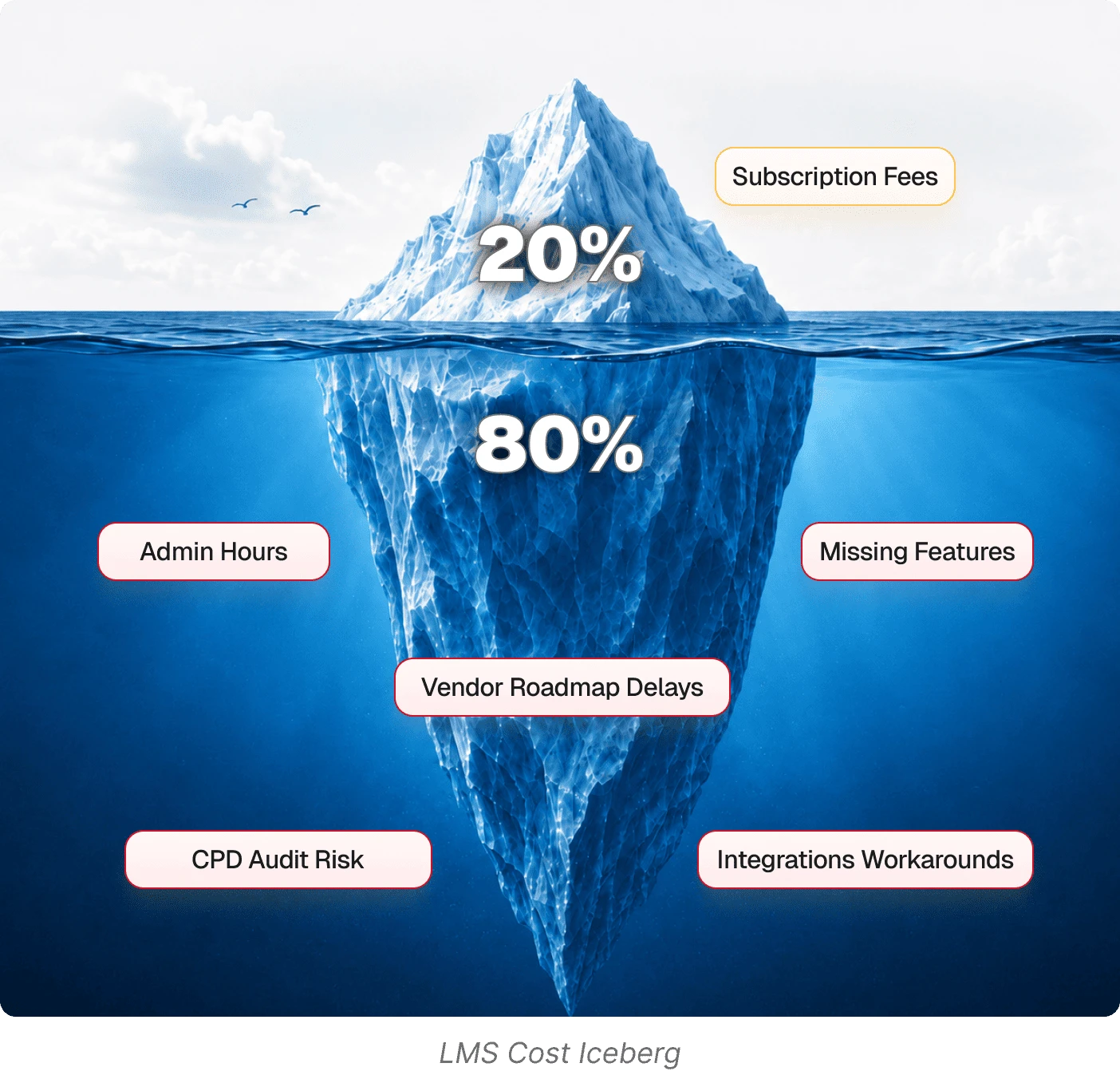
We use the 20/80 split as a diagnostic tool. The subscription may be 15% of your total cost, or 60%. Until you measure the work and spending around it, you cannot know the true cost of LMS or whether it offers good value.
What the SaaS LMS subscription doesn’t cover
The visible 20% needs little explanation. The more interesting question is what makes up the other 80%.
The work before launch
Buying access is only the beginning. Before anyone can learn, the team has to move the old data, set up the new platform, rebuild roles and reports, train administrators, and show learners how everything works. All that isn’t free.
The LMS data migration cost can run $2,000–$20,000+ depending on volume and how much of your legacy system has to be untangled. Vendor onboarding and implementation is a $5,000–$30,000 one-time fee on top of the subscription you already budgeted. Continu, for example, prices it at 10% of your first-year contract value.
To sum up, you could already be $7,000 to $50,000+ beyond the subscription price.
Connecting the rest of your stack
Your LMS needs to talk to the other systems you use. Perhaps an HR system, CRM, identity provider, payment gateway, webinar platform, content library, or BI tool. The vendor might offer a connector, but access often requires a higher tier, middleware costs, implementation work, or all three.
A basic HRIS integration can involve $1,000–$15,000 in setup work, plus $500–$3,000/year to keep working. That’s before touching anything else in the stack, like SSO, payment processing, CRM. Middleware can range from hundreds to thousands of dollars per year as automation volume grows. If the standard connector cannot handle your group logic or customer hierarchy, someone has to build and support the missing workflow. The same applies when you want to integrate AI with your LMS: the tool still needs access to the right data and workflows.
Putting content inside it
A course-authoring tool like Articulate 360 runs $1,299–$1,499 per user/year. Enterprise content-library subscriptions, like LinkedIn Learning and equivalents, run $15,000–$100,000+/year. Yes, you read that right: the content library alone can cost more than the LMS subscription.
The people behind the platform
SaaS handles the servers, which is useful. The day-to-day administration still belongs to your team. Someone has to answer access questions, manage catalogs, correct enrollment errors, and pull reports. That can take 0.25–1.0 FTE and cost $20,000–$80,000 a year. Add another 50–200 developer hours a year, or $2,500–$30,000, to maintain the integrations.
One cost SaaS does cover
With a SaaS LMS, hosting is bundled into the subscription, so let’s give SaaS credit for that. If you go open-source, it becomes its own cost. For example, managed Moodle hosting alone runs $2,000–$20,000/year.
LMS support cost
Most platforms sell support in tiers. It usually means a 24–48 hour response window and a shared ticket queue. Move up to Priority, and you’re paying for same-day response, a dedicated account manager, and custom SLAs. When compliance is at stake, a broken certification workflow needs attention today. That faster response can add 10–25% to your license cost.
Getting everyone up to speed
The LMS onboarding cost starts with admin training, which can run from $500 to $5,000 when it is not bundled into implementation. For a large rollout, expect to spend another $2,000–$15,000 on launch communications, employee walkthroughs, and support during the first month.
Have you seen any of these costs in the subscription price? Probably not. Vendors don’t put them upfront. Some don’t even publish the subscription price itself.
So far, every cost has come with a number. The next one doesn’t.
The hidden cost with no price tag
We call it the CPD Visibility Gap. An LMS may capture the courses completed inside the platform. That’s around 20% of actual CPD activity. The other 80% (conference attendance, external certifications, informal learning) lives in spreadsheets and inboxes.
When the records are spread out, completed training can be difficult to prove. That’s the hidden cost: the organization may be compliant in practice, but unable to show it when asked.
One of our clients, a leading Irish corporate law firm, already used LearnUpon. It handled course delivery well, but external CPD remained invisible. We added CPD tracking software in two months, giving more than 600 employees real-time progress tracking and audit-ready records without replacing the LMS. Need more details on how it worked? Here’s the full case study.
It would be easy to stop here and make SaaS look expensive. But a fair comparison should also count the cost of custom LMS development.
What you pay for a custom LMS
A custom LMS has its own cost stack. You still need hosting, monitoring, security, maintenance, support, and continued development. Content tools and integrations may cost the same as they would with SaaS. The total and true cost of LMS depends on what you build and who builds it. You have several options here:
Build it in-house
A six-person US team runs $920K–$990K a year in salaries alone.
Go open-source (Moodle)
The license is free, but running it eats $47K–$94K a year.
Hire a generalist agency.
$200K+ over 12–18 months.
Work with an LMS-specialized partner.
We start from a pre-built foundation, so 80% is already built. Projects range from $17,000 to $120,000, depending on scope.
At Academy Smart, we offer three ways in:
A custom LMS has its own cost stack. You still need hosting, monitoring, security, maintenance, support, and continued development. Content tools and integrations may cost the same as they would with SaaS. The total and true cost of LMS depends on what you build and who builds it. You have several options here:
Smart LMS
$17K or $800/mo
Custom LMS
$85K–$120K fixed
CPD Dashboard
$11.5K one time or $550/mo
for compliance tracking on top of an existing platform.
Ongoing support is free for the first year, then runs $700–$9,000/month depending on how hands-on you want us to be. And your bill doesn’t grow with the number of users.
Those figures explain the investment. To justify it internally, you also need to show the return. Our guide explains how to present LMS ROI to your CFO.
Calculate the number your invoice does not show
When you compare SaaS with a custom LMS, give both sides the same three-to-five-year window. Count the subscription and operating costs for SaaS, then the build and the LMS total cost of ownership if you’re going for custom.
And no, you don’t need to wrestle with a spreadsheet. Add your numbers to our SaaS vs. Custom LMS Cost Calculator. It uses your user count, subscription, implementation, integrations, support, and expected growth to calculate your five-year cost for both options. You will also see when one may become cheaper than the other.